
On this page
- Why WordPress Becomes a Problem for Nonprofits
- How Static Sites Cut Hosting and Maintenance Costs
- Speed, Donor Trust, and Why Performance Matters
- Security and Reliability Without a WordPress Backend
- Keeping Donation and Volunteer Forms on a Static Site
- Preserving URLs, SEO, and Rankings During Migration
- The Practical Process of Moving Off WordPress
- Editing Content Without WordPress: ESC’dashboard
- Tradeoffs: What Nonprofits Gain and Give Up with Static Sites
- Frequently asked questions
Why WordPress Becomes a Problem for Nonprofits
For many nonprofits, WordPress was the obvious starting point: it is popular, flexible, and most agencies default to building sites with it. Over time, though, the same strengths that made WordPress appealing can become liabilities. Every new plugin, theme update, and integration adds complexity - and that complexity translates into more maintenance, higher hosting costs, and slower performance for donors and volunteers trying to use your site.
On a typical nonprofit WordPress site, it’s normal to see 20-40 active plugins: form builders, page builders, SEO, security, caching, donation tools, sliders, analytics, spam filters, and more. Each plugin introduces potential bugs and security vulnerabilities, and many load extra CSS and JavaScript on every page request. The result is a page that should have been a simple "About" or "Donate" screen turning into a long chain of database queries and asset downloads, all of which your visitors have to wait for.
For organizations with tight budgets and limited staff, this overhead is not just technical - it’s operational. Someone has to approve updates, test changes, fix layout issues caused by theme conflicts, and respond when an update breaks the donation form. Many nonprofits end up paying agencies or freelancers for ongoing maintenance that primarily exists because WordPress is dynamic and stateful, not static and simple.
Security is another persistent pain point. A WordPress site with dozens of plugins and infrequent updates is a magnet for automated attacks. Even if you never suffer a major breach, the constant need for monitoring and patching diverts attention from more mission-critical work. For nonprofits that handle sensitive donor information, reputational risk alone is a serious concern.
Static site approaches exist to remove this complexity. Instead of generating pages from a database on the fly, a static site serves pre-built HTML from a global content delivery network (CDN). Wordpress Escape takes this a step further: it permanently deletes WordPress after migrating your site to static Hugo on Cloudflare’s edge, preserving every URL, ranking, and the existing look and feel. The result is a nonprofit website that behaves like your familiar WordPress site from the front end, but without the fragile stack underneath.
How Static Sites Cut Hosting and Maintenance Costs
For nonprofits, every dollar spent on infrastructure is a dollar not spent on programs and outreach. This makes the economics of your website platform surprisingly important. Traditional WordPress hosting typically involves a PHP runtime, a MySQL database, backups, security add-ons, and often premium plugins. Even "cheap" shared hosting becomes expensive when you factor in reliability, performance, and the cost of someone who knows how to fix things when they break.
A static site changes this equation. Instead of renting a full web server stack, you serve files - HTML, CSS, and JavaScript - from a highly optimized CDN. Cloudflare’s edge network is designed to deliver static assets at extremely low cost and high performance, often with bandwidth and request allowances that cover most small to mid-sized nonprofit sites for almost nothing. In many cases, organizations moving from WordPress to static hosting see their monthly hosting costs drop from tens or hundreds of dollars to a few dollars or even effectively zero within free tiers.
Maintenance costs also shrink. There is no PHP engine to keep patched, no database to tune or repair, and no plugin update treadmill. When your site is static, the attack surface is dramatically reduced, and the need for emergency "something broke after an update" calls diminishes with it. Instead of a constant stream of small technical issues, you have a simpler deployment pipeline: update content, regenerate static pages, and publish.
Wordpress Escape’s approach focuses on nonprofits that want to lock in these savings without giving up their existing site structure. By migrating everything to Hugo and Cloudflare’s edge and then deleting WordPress completely, the service removes ongoing hosting expenses tied to traditional PHP/MySQL stacks. It also replaces the WordPress dashboard with ESC’dashboard, a familiar interface where your team can edit pages and posts without having to understand static site generators or DevOps.
Over the long term, this shift can meaningfully impact your budget. If you currently pay $50 - $150 per month for managed WordPress hosting plus periodic agency fees for maintenance and clean-up, moving to a static architecture may reduce recurring costs to a fraction of that while delivering better speed and reliability. For a nonprofit, that annual savings might fund additional campaigns, materials, or staff hours - without sacrificing your digital presence.
Speed, Donor Trust, and Why Performance Matters
Performance is not just a technical metric; it directly affects whether donors complete transactions and volunteers finish sign-up forms. Slow, jittery pages erode trust and patience, especially for visitors on mobile devices or slower connections. When a donor clicks "Donate" and the page stalls or shifts while loading, there is a real chance they abandon the process and never come back.
Static sites excel at performance because they are designed around pre-rendered content served as close to the visitor as possible. Instead of generating each page request via PHP and database queries, the server simply returns a ready-made HTML file and a small set of assets. On Cloudflare’s global edge network, this often translates to time to first byte (TTFB) measurements on the order of tens of milliseconds rather than hundreds or thousands. Wordpress Escape’s own migrations have produced PageSpeed scores around 94+ on desktop and mobile, TTFB near 30ms, and cumulative layout shift (CLS) effectively at 0.
For nonprofits, these numbers matter where it counts: donation pages, volunteer forms, newsletter sign-ups, and event registrations. A fast-loading donation page reduces friction and reassures visitors that the site is professionally maintained and trustworthy. Low CLS means the page doesn’t jump around while loading, so users can confidently tap buttons and fill out fields without accidentally clicking the wrong thing due to layout shifts.
Mobile performance is particularly critical. Many individual donors encounter nonprofits for the first time via social media links, email campaigns, or messaging apps on their phones. If your WordPress site loads in three to six seconds because of heavy plugins, unoptimized images, and slow shared hosting, you risk losing a meaningful portion of those visitors before they ever read about your mission.
By moving to a static architecture, nonprofits can expect a tangible improvement in these user-facing metrics. Wordpress Escape’s workflow is tuned to preserve your existing branding and layouts while stripping out unnecessary dynamic overhead. The end result is a site that looks familiar but behaves more like a lightweight application: fast, stable, and responsive under load. This builds donor confidence, which is especially important for smaller organizations competing with larger, more polished charities online.
Security and Reliability Without a WordPress Backend
Nonprofits are increasingly targets for automated attacks and phishing campaigns because they maintain donor databases and often run recognizable public brands. WordPress, as the most widely used CMS, is also the most widely scanned and exploited platform. Even with security plugins and best practices, a dynamic WordPress site remains susceptible to vulnerabilities in themes, plugins, and the core software itself. For small organizations without dedicated IT staff, keeping up with this risk landscape is a constant challenge.
A static site eliminates many of these concerns by design. When your site consists of fixed HTML files and assets served via a CDN, there is no public database, no login screen exposed to bots, and no PHP engine interpreting code on every request. The typical attack vectors - SQL injection, authentication brute-force, plugin exploit chains - simply do not apply to a static front end. This does not mean you are invulnerable, but it significantly reduces the number of ways an attacker can compromise your public site.
Reliability improves along with security. Dynamic WordPress sites can fail due to database connection issues, PHP version mismatches, or conflicts between plugins after updates. Static sites are far less prone to runtime errors because the page-building process happens before deployment, not during each visitor request. If a page builds successfully, it will serve successfully, regardless of traffic spikes or momentary hiccups in backend infrastructure.
Wordpress Escape’s migration process is deliberately focused on making this security and reliability benefit accessible to nonprofits without forcing them into complex infrastructure choices. By rebuilding sites in Hugo and deploying them on Cloudflare’s edge, the service leverages a globally distributed network that is already hardened against many common threats. Once the static site is in place and validated, WordPress is fully deleted from the hosting environment - there is no hidden backend or half-migrated system lingering in the background.
For nonprofits, this means fewer emergency incidents, reduced dependence on external agencies for security fixes, and more predictable operational behavior. Critical pages like donation forms and event information are less likely to go down at the worst possible moment. Instead of worrying about plugin vulnerabilities, your team can focus on content, campaigns, and direct engagement with your supporters.
Keeping Donation and Volunteer Forms on a Static Site
One of the biggest concerns nonprofits have when considering static sites is how to handle dynamic interactions: donation forms, volunteer sign-ups, petitions, and event registrations. These are mission-critical workflows, and it’s reasonable to worry that "static" means losing the ability to collect data or process payments. In practice, modern static architectures handle these needs by leaning on specialized form and donation services that integrate via embeds or secure APIs.
If your nonprofit is already using platforms like Donorbox, GiveWP, Stripe-hosted payment pages, or other third-party donation tools, there’s a good chance your current WordPress site is embedding those forms rather than processing everything locally. Those same embeds can be preserved when migrating to a static site. As long as the underlying service supports being framed or script-injected into a standard HTML page, your donation workflow can remain intact.
Volunteer forms and contact requests can be handled similarly. Instead of relying on a WordPress-specific form plugin that writes entries to a local database, you can connect static pages to form-handling services that accept POST requests and forward submissions via email or store them in a secure dashboard. From a visitor’s perspective, the experience is identical: they see a form, fill it out, click submit, and receive a confirmation. The difference is that the processing happens offsite, in a service built specifically for this purpose.
Wordpress Escape’s migration process explicitly accounts for these dependencies. During the rebuild, the team identifies donation widgets, volunteer forms, and other dynamic components, then ensures they are preserved within the static Hugo templates. Where the site uses WordPress-native tools like GiveWP, the approach is to keep the front-end embed or iframe in place while removing the WordPress backend. Because the final site is just HTML and JavaScript, these elements load faster and more reliably, even though the processing still occurs on the third-party platform.
This means nonprofits can move off WordPress entirely, gaining the performance and security benefits of a static site without sacrificing the essential functionality that keeps their operations running. The donation button still works, the volunteer application still submits, and your staff still receives the data they need - now supported by services that are decoupled from the risk and maintenance profile of a traditional CMS.
Preserving URLs, SEO, and Rankings During Migration
For nonprofits that rely on organic search traffic, any major platform change raises a serious question: will this hurt our rankings? Over years of campaigns, blog posts, and resource pages, your organization may have accumulated hundreds or thousands of inbound links, many of them pointing to specific URLs on your WordPress site. Losing those URLs - or changing them without a carefully managed redirect plan - can damage your visibility and make it harder for supporters to find you.
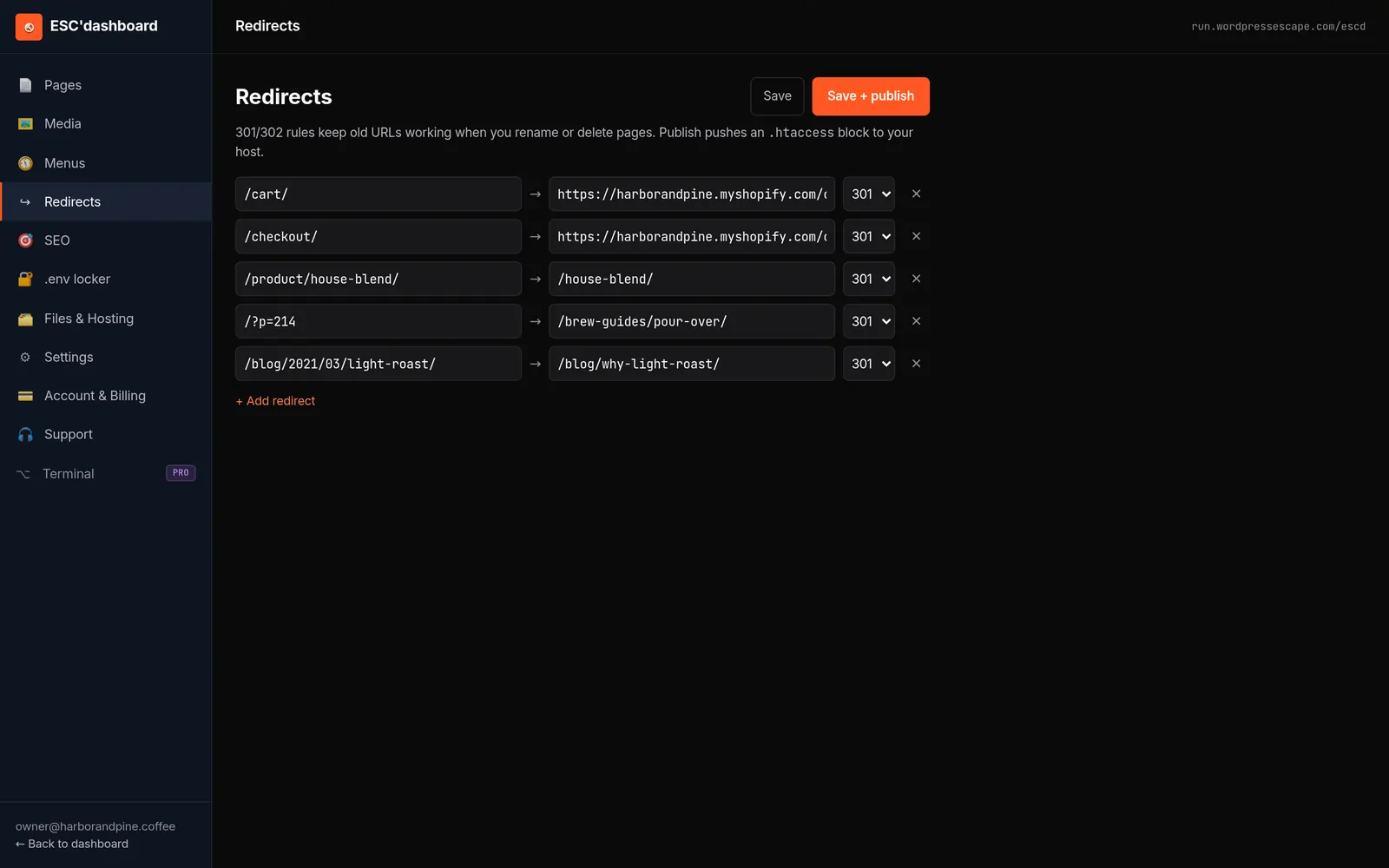
Static migration does not have to mean URL disruption. When executed carefully, it is entirely possible to keep every URL exactly as it is today, including slugs for posts, categories, and special landing pages. The key is to replicate the routing logic of WordPress in the static generator and hosting environment, so that visitors and search engines receive the same paths and content they did before, just served faster and more reliably.
Wordpress Escape’s process is explicitly built around this requirement. The service crawls and exports the full URL structure of the existing site, then rebuilds it in Hugo so that each page lives at the same path. For complex sites, this can involve tens or hundreds of thousands of URLs; Wordpress Escape has successfully migrated its own property of over 528,854 pages without losing a single URL in the process. All internal links, canonical tags, and sitemap entries are aligned with the new static architecture to preserve SEO signals.
Metadata preservation is equally important. Title tags, meta descriptions, Open Graph tags for social sharing, structured data snippets, and language attributes all contribute to how search engines understand and rank your content. During migration, these elements can be extracted from the WordPress database and embedded into the static templates. Because static sites serve pages consistently, there is often less risk of misconfigured metadata due to plugin conflicts or theme updates.
For nonprofits, this means you can improve site speed and security without forfeiting the visibility you’ve built over time. The migration becomes an opportunity to clean up technical SEO issues - such as broken links, inconsistent canonicalization, or duplicate content - while preserving the URLs and content that already perform well. When search engines see the same structure with better performance and cleaner delivery, the risk of negative impact is minimized and, in many cases, the technical improvements may help your pages compete more effectively.
The Practical Process of Moving Off WordPress
Understanding the migration process helps reduce anxiety about such a significant change. For nonprofits, the goal is to transition from WordPress to a static site with minimal downtime, no lost content, and a clear path for staff to keep editing the site after the change. While DIY static tools exist, they often require technical skills and still leave WordPress running as a hidden backend. The approach taken by Wordpress Escape focuses on end-to-end replacement.
The process typically begins with a comprehensive audit of your existing WordPress installation. This includes mapping all public URLs, identifying active plugins that affect front-end output, cataloging themes and custom templates, and noting critical features such as donation embeds, contact forms, and events pages. This step is essential to ensure that nothing important is overlooked when the static version is generated.
Next, the content and structure are exported and rebuilt in Hugo, a modern static site generator known for speed and flexibility. Each page is transformed into static HTML with corresponding assets, mirroring your current design and layout. During this phase, page performance optimizations are applied: unnecessary scripts are removed, CSS is streamlined, and images can be compressed or served in modern formats. Donor and volunteer form embeds are preserved as-is, so their behavior remains unchanged.
Once the static site is ready, it is deployed to Cloudflare’s edge network. DNS settings are updated so that your domain now points to the static deployment rather than the old WordPress server. Cloudflare handles routing, caching, and global distribution, ensuring that visitors from different regions receive fast responses. Careful testing confirms that all URLs work as expected, donation and contact forms submit correctly, and key pages display accurately.
The final step is decommissioning WordPress. Unlike hybrid approaches that leave WordPress running in the background, Wordpress Escape removes the WordPress application and database entirely from your hosting environment. In its place, the ESC’dashboard is installed - a WordPress-style editor that allows your nonprofit staff to create and update content without touching code or learning Hugo. From this point on, your site is static under the hood, but your workflow resembles what you were used to, with fewer surprises and less risk.
Editing Content Without WordPress: ESC’dashboard
One of the biggest practical questions nonprofits have about static sites is, "How will our staff edit content?" A pure static site traditionally requires developers to change templates and rebuild pages whenever updates are needed. That model is not workable for organizations where non-technical staff manage news posts, campaign pages, and resource libraries. Any solution that replaces WordPress must provide a user-friendly editing experience.
ESC’dashboard is designed to bridge this gap. It provides a browser-based interface that looks and feels similar to a WordPress admin area, with lists of pages and posts, editable fields for titles and content, and simple controls for publishing changes. Underneath, instead of writing to a database and serving content dynamically, ESC’dashboard commits changes to static files that Hugo uses to regenerate the site. From an editor’s perspective, they are still pressing "Update" or "Publish" - the underlying mechanics are simply more efficient and secure.
This approach allows nonprofits to retain the editorial autonomy they expect from WordPress without the maintenance burden. Communications staff can log in, create a new campaign page, embed a donation form, add images and calls to action, and publish, all without needing to know anything about static generation or Cloudflare. Workflows such as drafting, review, and scheduled publishing can be preserved or recreated in the dashboard according to your organization’s needs.
Because the static build is automated, the risk of breaking the site through content updates is lower than in a traditional WordPress setup. Layouts and templates are defined clearly, and ESC’dashboard enforces structure so that editors can focus on text and media rather than manipulating low-level HTML. This reduces the likelihood of layout issues caused by page builders or shortcodes pasted in the wrong place - issues that often plague nonprofit WordPress sites.
For nonprofits considering a move off WordPress, knowing that there is a practical, non-technical way to manage content after migration is crucial. ESC’dashboard exists precisely to answer that concern. Your public site becomes static and fast, but your internal workflow remains familiar and accessible, enabling your team to keep telling your story and updating supporters without needing a developer for every small change.
Tradeoffs: What Nonprofits Gain and Give Up with Static Sites
Moving from WordPress to a static site architecture is a strategic decision with clear upsides, but it is not without tradeoffs. Nonprofits should understand these tradeoffs before making the shift, especially if they rely heavily on certain WordPress-specific features or workflows. The goal is to align your web platform with how your organization actually operates, not to chase technology for its own sake.
On the gain side, static sites offer substantially faster performance, reduced hosting and maintenance costs, and a smaller security footprint. Pages load quickly, even under load, because they are served from a global CDN rather than generated on demand. The absence of a dynamic backend means fewer emergency fixes and less time spent on updates and patching. For nonprofits with constrained budgets and limited technical staff, these are significant advantages that can free up resources for core mission work.
However, static sites change how certain dynamic features are implemented. Traditional WordPress extensions such as complex membership plugins, learning management systems, or community forums may not map cleanly to a static architecture. In many cases, they must be replaced with specialized SaaS tools that integrate via embeds or APIs. While this can result in better reliability and security, it also means you are relying on external services rather than self-hosted plugins.
Another tradeoff is the reduced ability for non-technical staff to install new functionality on their own. In WordPress, adding a new feature often involves searching the plugin directory and clicking "Install." In a static setup managed through a service like Wordpress Escape, implementing new integrations or major changes to site behavior typically involves a planned update to templates and build configuration. This can be beneficial in terms of stability, but it does introduce a more deliberate change process.
For most nonprofits focused on donations, storytelling, and simple program information, these tradeoffs are favorable. The features they care about - donation forms, contact and volunteer sign-ups, blogs, resource libraries, event pages - are easily supported on static sites using modern embeds and form services. Wordpress Escape’s model, which permanently removes WordPress while retaining a familiar editing interface, is tailored to these use cases. By understanding where static sites differ from dynamic CMS platforms, nonprofits can make a confident, informed decision about what best supports their mission online.
Frequently asked questions
Will moving to a static site break our donation forms?
If your donation forms are powered by services like Donorbox, GiveWP, or other embeddable tools, they can be preserved on a static site without breaking the workflow. The form embed remains in the page, while the processing continues to happen on the underlying donation platform. A carefully managed migration ensures that the donate button, form fields, and confirmation messages behave exactly as they did before, just with faster page loads.
Can a static site support our blog and resource library?
Yes, static sites are very well suited to blogs and resource libraries because they deliver pre-rendered pages quickly and consistently. Posts and resource entries become static HTML files organized by categories and tags, which search engines can crawl easily. With an editor like ESC’dashboard, your team can continue to publish new content regularly without dealing with WordPress plugins or database issues.
How will staff edit content after we delete WordPress?
After WordPress is removed, editing can be handled through a dashboard built for non-technical users, such as ESC’dashboard. It provides a familiar interface for managing pages and posts, allowing staff to change text, images, and embeds without touching code. Behind the scenes, those changes are converted into static files and deployed to the site, so your team retains control over content while benefiting from a faster, more secure architecture.
Will we lose our existing URLs and search rankings?
A well-planned static migration preserves your existing URL structure so that visitors and search engines see the same paths as before. Title tags, meta descriptions, and other SEO-relevant metadata can be carried over into the static templates. When implemented correctly, this means your rankings and inbound links remain intact, and you gain the additional benefit of improved performance, which can positively influence search visibility.
Is a static site really cheaper than managed WordPress hosting?
For most nonprofits, static hosting on a global CDN is significantly cheaper than maintaining a full WordPress stack with PHP, MySQL, and premium plugins. Many static deployments fit comfortably within low-cost or even free tiers, especially for modest traffic volumes. When you add in reduced maintenance and fewer emergency fixes, the total cost of ownership for a static site is typically much lower than for a comparable WordPress installation.
What types of nonprofits benefit most from moving off WordPress?
Nonprofits that primarily need fast, reliable pages for donations, volunteer sign-ups, storytelling, and resource sharing benefit the most from static sites. Organizations without dedicated technical staff, or those spending a disproportionate amount of time and money on WordPress maintenance, security, and hosting, stand to gain significant savings and stability. If your site’s core value is delivering information and collecting form submissions, a static architecture is often a strong fit.
How long does a typical migration from WordPress to static take?
The timeline depends on the size and complexity of your site, but many small to mid-sized nonprofit sites can be migrated in weeks rather than months. The process includes auditing the existing WordPress setup, exporting and rebuilding content in a static generator, deploying to a CDN, and thoroughly testing forms and URLs. With an experienced migration team, this can be done with minimal disruption to your operations and without significant downtime for visitors.
See your own numbers first
Every site is different. Run the free 60-second audit on your site - real SEO + speed grades, no login - then decide.
Scan my site free