
On this page
- Why migrate a Base44 site in the first place?
- Understanding the Base44 lock-in: what you’re leaving behind
- Static vs Base44: performance and SEO in the real world
- Planning your Base44 migration: inventory, URLs, and risks
- Choosing your static stack: Hugo, edge hosting, and an editor
- Step-by-step: migrating a Base44 site to static without losing URLs
- Preserving SEO: canonicals, redirects, and structured data
- Replacing Base44’s editor: a WordPress-style dashboard, no WordPress underneath
- Lessons from large static migrations: scale, testing, and cutover
- Is migrating off Base44 worth it? Tradeoffs and when to stay put
- Frequently asked questions
Why migrate a Base44 site in the first place?
Base44 is a compelling platform when you want to get something online fast. You get a hosted environment, a visual builder, and a bundle of performance optimizations you don’t have to think about. The tradeoff is that your business website is now deeply tied to a proprietary system: Base44’s editor, hosting, and URL structure. As your site and traffic grow, this lock-in can start to feel like a limitation rather than a convenience.
The most common reasons owners consider migrating away from Base44 are control, portability, and SEO. You don’t fully control the stack, you can’t just zip up the site and move it to another host, and you’re dependent on Base44’s implementation for critical SEO factors like canonical URLs, structured data, and performance. Even if Base44 is fast today, you have very little say over how the platform evolves and how that affects your rankings and analytics in the future.
There’s also the question of ownership and flexibility. On Base44, your content lives inside a platform that decides how it’s stored, rendered, and deployed. If you want to integrate with a different CDN, test an alternative build pipeline, or adopt a new analytics stack, you are limited to whatever Base44 exposes. Migrating to a static site you fully control flips that model: you own the build system, the hosting environment, and the content structure, instead of renting them from a vendor.
Finally, there’s risk management. Platform businesses can change pricing, features, or even shut down. A static site built on open tools like Hugo and deployed on a global edge network can be moved, backed up, or rebuilt independent of any single commercial platform. For owners who treat their site as a long-term asset rather than a short-term landing page, that independence becomes a strategic advantage.
- Control: Decide where and how your site is hosted, cached, and delivered.
- Portability: Move between hosts or CDNs without rebuilding your content from scratch.
- SEO stability: Keep URLs, meta data, and performance under your own governance.
- Risk management: Avoid platform lock-in and ensure your site survives vendor changes.
Understanding the Base44 lock-in: what you’re leaving behind
Before you migrate, it’s important to understand exactly what Base44 is doing for you today, and what parts of that stack you’ll need to replace in your new static setup. Base44 typically combines a visual builder, a proprietary hosting platform, and an app-style delivery model that can blur the lines between pages, routes, and content types. The result feels smooth for end users, but the underlying implementation is tightly coupled to Base44 itself.
At a practical level, your content, media, and URLs are all structured according to Base44’s rules. Page templates, routing behavior, and canonical URLs are governed by the platform. If Base44 implements SPA-style transitions, client-side routing, or custom caching logic, those choices impact how search engines crawl and index your site. As long as you stay, you benefit from Base44’s optimizations; once you leave, you must recreate the parts that matter for your users and your rankings.
The lock-in shows up most clearly when you try to export or move your site. There is rarely a single "download everything as static HTML" button that preserves every nuance of routing, meta tags, and structured data. Even when export is possible, it often produces HTML that assumes Base44-specific assets, scripts, or APIs are present. If you simply drop that onto generic hosting, you risk broken functionality or subtle SEO regressions that erode traffic over time.
Migrating to a static, owner-controlled site means you replace three main pieces: the rendering engine (what turns content into HTML), the hosting/CDN (where the HTML lives), and the editor (how you manage content day to day). With a modern static generator like Hugo on an edge network, you can match or exceed Base44’s performance, but you must make deliberate choices for URLs, redirects, meta data, and content workflows so the migration preserves what works and frees you from what doesn’t.
- Rendering lock-in: Templates and routing are proprietary to Base44’s builder.
- Hosting lock-in: Caching, SSL, and performance optimizations live inside the Base44 platform.
- Editor lock-in: Content workflows depend on Base44’s back office UI.
- Export friction: Simple HTML export often fails to capture the full behavior of your site.
Static vs Base44: performance and SEO in the real world
From a user’s perspective, Base44 feels fast. It’s designed as an app builder, not a heavyweight CMS, so most sites load quickly and respond smoothly. The key question is whether you can match or surpass that experience with a static stack without giving up the conveniences of a visual editor. In practice, a well-built static site deployed on a global edge network consistently delivers better performance metrics than any dynamic or proprietary app builder, often with lower long-term complexity.
When you migrate to a static generator like Hugo and deploy to an edge network, you eliminate server-side processing at request time, database lookups, and most runtime logic. The resulting HTML, CSS, and JS are pre-built and cached near your visitors. In concrete terms, it’s realistic to see PageSpeed scores in the mid-90s, time to first byte around 30 ms, and cumulative layout shift at zero for well-structured pages. Those metrics translate directly into better user experience and often into stronger search performance on competitive queries.
SEO benefits extend beyond raw speed. Static sites make it easier to standardize canonical URLs, ensure clean internal linking, and maintain precise control over meta tags, heading structures, and structured data. Because there is no opaque runtime, you can inspect and audit the exact HTML search engines see. If you’ve been relying on Base44’s defaults for titles, descriptions, and social sharing tags, shifting to static gives you the opportunity to systematize those elements for hundreds or thousands of pages at once.
Of course, there are tradeoffs. A static site won’t give you dynamic app features out of the box, and you must be deliberate about how you handle forms, user accounts, and personalized content. But for content-heavy marketing sites, documentation, and blogs - the types of sites most businesses run on Base44 - the gains in speed, crawlability, and control typically outweigh the loss of app-specific conveniences. The key is to design the migration around your real usage patterns rather than treating static as a generic export.
- Performance gains: Pre-built HTML on the edge routinely outperforms dynamic app builders.
- SEO clarity: Static delivery lets you control and audit exactly what search engines see.
- Metric examples: PageSpeed scores around 94+, ~30 ms TTFB, 0 CLS are realistic for well-optimized static sites.
- Tradeoffs: Dynamic app features require separate solutions or careful rethinking.
Planning your Base44 migration: inventory, URLs, and risks
A successful Base44 migration starts with a clear inventory of what you have today and what you’re willing to change. Before touching code or hosting, you should map out your current URLs, page types, and critical SEO assets. This step might feel tedious, but it’s the difference between a smooth handoff where rankings stay intact and a messy cutover where hidden dependencies break and traffic drops without an obvious cause.
Begin by crawling your Base44 site with a tool that can capture every public URL, status code, title tag, and canonical link. Export that data and group URLs by type: core pages, blog posts, documentation, landing pages, and any special routes Base44 uses for app-like behavior. Pay particular attention to URL parameters, subdirectory structures, and any language or region variants. Your goal is to understand the current routing well enough to reproduce or intentionally adjust it in your static setup.
Next, identify your high-value pages. These are URLs that bring in significant organic traffic, have strong backlinks, or convert well for your business. For those pages, you should be especially conservative with changes: keep the URL, maintain the same content hierarchy, and preserve critical meta tags as closely as possible. For lower-value or thin pages, you can consider consolidation, but document every change so you can monitor its impact after launch.
Risk management is central to the plan. List the ways a migration could harm your business: loss of key URLs, broken redirects, slower performance, or misconfigured analytics. For each risk, define a mitigation: automated testing of status codes after deployment, strict redirect mapping, performance benchmarking before and after, and analytics validation. If your Base44 site uses any app-specific features (views that depend on user state, dashboards, or embedded tools), decide whether they will be rebuilt, replaced with third-party widgets, or dropped.
- Crawl and inventory: Capture a full list of URLs, titles, canonicals, and status codes.
- Group by type: Separate core pages, content sections, and special app routes.
- Prioritize: Flag high-value URLs where change is risky and conservatism is wise.
- Define risks: Document potential SEO, performance, and analytics pitfalls and how you’ll handle them.
Choosing your static stack: Hugo, edge hosting, and an editor
Once you know what you’re migrating, you can choose the stack that will replace Base44. At a high level, you need three components: a static site generator, an edge-based hosting platform, and an editor your team can actually use day to day. The combination should match or exceed Base44’s performance while giving you full control over URLs, templates, and content workflows.
A generator like Hugo is a strong fit for Base44 migrations because it’s designed for very large sites and fast builds. It can comfortably handle hundreds of thousands of pages without slowing down, which matters if your Base44 site has grown beyond a simple brochure site. In practice, Hugo’s build times stay short even for sites with half a million URLs, making it feasible to rebuild frequently and keep content fresh without complex infrastructure.
For hosting, an edge network such as Cloudflare’s global CDN positions your static HTML near your visitors world-wide. Instead of a single origin server handling every request, you get distributed caches that respond in tens of milliseconds. That setup is how static migrations can legitimately achieve time to first byte around 30 ms and eliminate layout shift caused by slow assets. The hosting layer also becomes simpler: you configure SSL, caching, and redirects centrally, without worrying about app servers or databases.
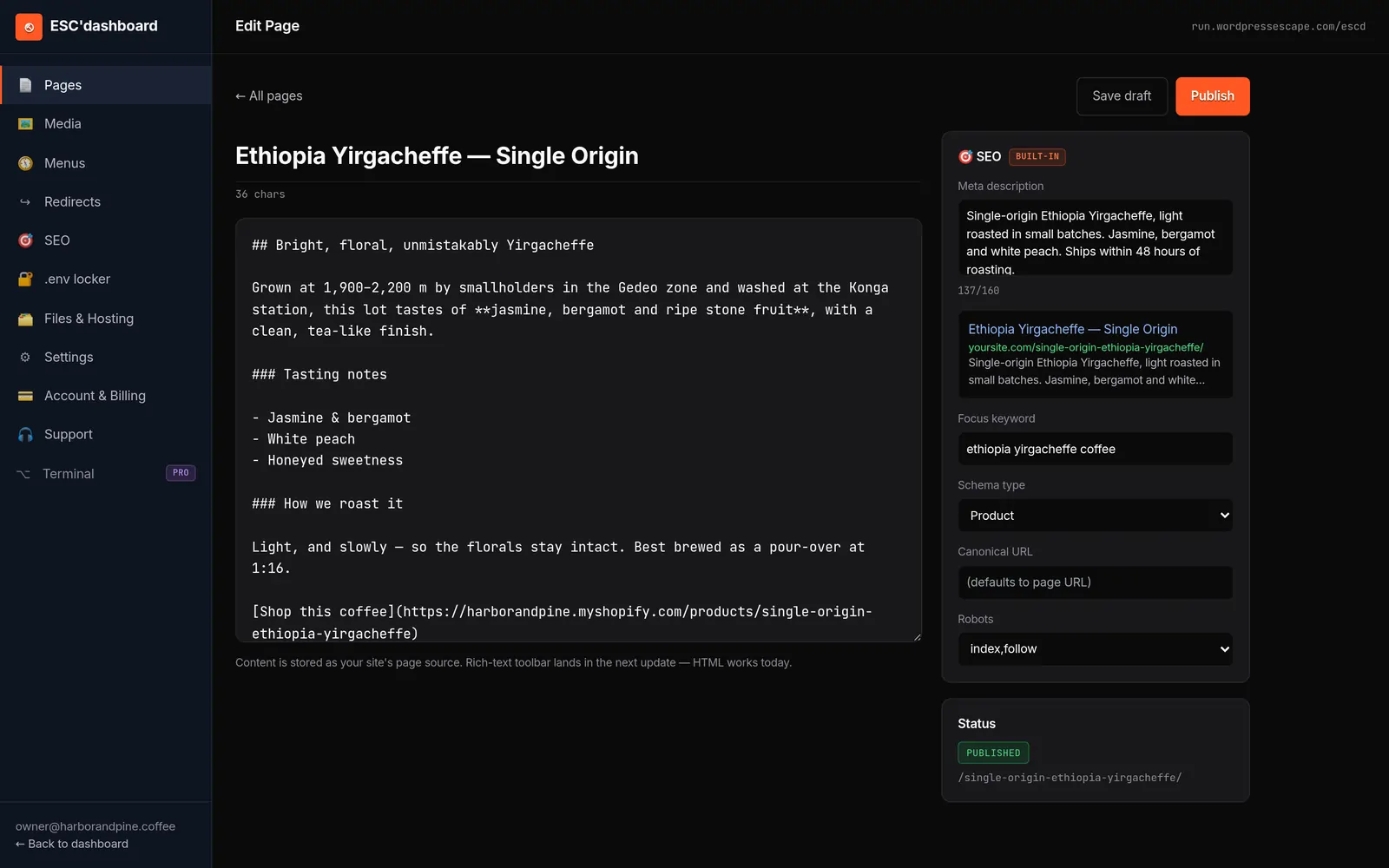
The remaining piece is the editor. Developers love Hugo’s folder and markdown structure, but non-technical teams need a familiar interface. One approach is to provide a WordPress-style dashboard on top of static content, where editors can log in, click "Add page," and manage meta data without touching code. The key is that this editor does not reintroduce WordPress or a heavy CMS under the hood; it simply writes to the static source and triggers rebuilds. That way, your Base44 migration preserves the ease of a visual tool while delivering static performance and full stack ownership.
- Static generator: Hugo offers fast builds and scales to hundreds of thousands of pages.
- Edge hosting: Global CDNs like Cloudflare deliver sub-50 ms TTFB and robust caching.
- Friendly editor: A WordPress-style dashboard can sit on top of your static source.
- No hidden CMS: Avoid recreating Base44-style lock-in by keeping the stack transparent and static-first.
Step-by-step: migrating a Base44 site to static without losing URLs
With planning and Stack decisions made, the actual migration from Base44 to static can follow a repeatable sequence. The goal is to preserve every important URL and its SEO signals while swapping out the underlying platform. When done carefully, the cutover is invisible to users and search engines, except for improved performance metrics and a more reliable delivery model.
Start by recreating your Base44 URL structure in the static generator. In Hugo, this means defining content types and permalinks that match your existing paths. For example, if your Base44 blog lives under /stories/ and your product pages under /apps/, you configure Hugo’s content folders and permalinks to produce identical URLs. Where Base44 uses query parameters or client-side routes, consider whether they can be converted into clean static paths or need server-side redirects.
Next, migrate content. This can be done via export, manual copy, or automated scripts depending on Base44’s capabilities and your site’s size. As you move content into Hugo, preserve headings, internal links, and meta data. For each page, map the old URL to the new static path in a routing file or a redirect configuration, even when they’re identical; this gives you a single source of truth for checking that nothing is lost.
After content is in place, focus on templates and styles. Rebuild your Base44 designs as Hugo templates, matching typography, layout, and brand assets as closely as possible. This is where you can also clean up technical debt: simplify CSS, remove unnecessary JavaScript, and standardize component usage. Once templates are ready, run test builds and deploy to a staging environment on your edge host. Crawl the staging site and compare URLs, titles, and canonicals against your original inventory to confirm that every page exists and matches.
- Replicate routing: Configure Hugo permalinks to mirror Base44’s URL structure.
- Migrate content: Move text, headings, and meta data while maintaining internal links.
- Rebuild templates: Implement brand-compliant layouts and styles in static templates.
- Verify parity: Use automated crawls to ensure the staging static site matches your Base44 inventory.
Preserving SEO: canonicals, redirects, and structured data
Keeping your search visibility intact during a Base44 migration is largely a matter of respecting three pillars: URLs, meta data, and structured data. If you preserve or carefully redirect URLs, maintain accurate titles and descriptions, and replicate your schema markup, search engines will treat the new static site as a continuation of the existing property rather than a completely new entity. The fewer surprises you introduce, the more stable your rankings will be.
Canonicals are a good starting point. Make sure every static page declares a rel="canonical" that matches the URL you intend to be primary. If your Base44 site previously relied on automatic canonical handling, this is your chance to make it explicit. For pages where the URL changes, configure 301 redirects from the old path to the new one and set the canonical to the new URL. Document these changes in a mapping file so you can audit them later if specific pages see ranking fluctuations.
Meta tags should be migrated carefully rather than reinvented overnight. Preserve titles and descriptions for high-value pages, adjusting only where you know the current text is underperforming. For lower-value pages, you can standardize formats using Hugo’s templating features, but avoid overly generic patterns that strip away meaning. Search engines use titles, descriptions, and headings to understand your content; consistency and clarity are more important than novelty during a migration.
Structured data is often overlooked but can be critical, especially if you rely on rich results. If Base44 generated JSON-LD for articles, products, or events, reproduce those schemas in your static templates. It’s easier to manage schema in a static generator because you can define reusable partials that pull data from front matter. That way, every new post or product automatically receives valid structured data. Once the static site is live, validate schemas with testing tools and monitor search console for any warnings.
- Canonicals: Explicitly set rel="canonical" for each page and align with your redirect strategy.
- Redirects: Use 301 redirects for any URL changes, mapping old Base44 paths to static equivalents.
- Meta tags: Preserve or cautiously refine titles and descriptions, especially on high-impact URLs.
- Schema: Recreate JSON-LD or microdata in static templates and validate after launch.
Replacing Base44’s editor: a WordPress-style dashboard, no WordPress underneath
One of the biggest hesitations owners have about leaving Base44 is the fear of losing a friendly, visual editing experience. Static generators are notoriously developer-centric, and few teams want to trade Base44’s builder for editing raw markdown on disk. The good news is that you can keep a WordPress-style dashboard while moving to a fully static stack, as long as you separate the editor from the runtime that serves your site.
The model is straightforward: your public site is static HTML, built by Hugo and deployed to an edge network. Behind the scenes, an editor application lets your team log in, manage pages and posts, and edit content in rich text. When someone hits "publish," the editor writes changes into the Hugo source structure and triggers a new build. Once the build completes, the updated static pages are pushed to the edge, and users see the changes almost immediately. There is no WordPress or Base44 serving pages at request time; the editor exists only as a content management layer.
This approach preserves the best parts of Base44’s UX - point-and-click editing, draft management, user roles - without reintroducing platform lock-in. Because the editor writes to transparent files and configuration, you can always move the site to another generator or hosting environment later. You’re not stuck with a proprietary app builder; you’re using a familiar dashboard as a front-end to an open static stack. For teams used to WordPress, this transition can feel surprisingly natural, since the editor can mimic common patterns like "Pages," "Posts," "Categories," and "SEO" panels.
The tradeoff is that some app-like interactions must be rethought. You won’t have real-time dynamic rendering of user-specific views unless you build them with client-side logic or external services. For most marketing and content sites, that’s acceptable. What you gain is a site that loads fast, cannot be compromised through WordPress vulnerabilities, and can scale from a handful of pages to hundreds of thousands without complex hosting.
- Static runtime: The live site is pure HTML, CSS, and JS served from the edge.
- Editor-only backend: A dashboard manages content and triggers builds, but never serves public requests.
- Familiar UX: WordPress-style patterns make the transition easier for non-technical editors.
- Future portability: Because content is stored in transparent formats, you can switch tools later without losing control.
Lessons from large static migrations: scale, testing, and cutover
Migrating a small Base44 site is one thing; migrating a large property with tens of thousands of pages is another. At scale, issues like build times, caching behavior, and redirect mapping become more complex, and the risk of missing edge-case URLs increases. Learning from large static migrations can help you design a process that works whether your site has 50 pages or 500,000.
First, validate that your static generator and hosting stack can handle your page volume. Hugo is known for staying fast even with hundreds of thousands of pages, with build times measured in seconds rather than minutes. Still, you should run test builds on a representative subset of your Base44 content to confirm performance and identify any template bottlenecks. If build times spike unexpectedly, it’s usually a sign that templates are doing too much work per page or that content structures need simplifying.
Second, invest in automated testing. For large migrations, manual spot-checking is not enough. Use crawling tools to compare the Base44 site and the static staging site for URL coverage, status codes, titles, and canonicals. Implement integration tests that verify key templates, forms, and navigation elements render correctly. The more you can automate, the more confident you’ll be that a cutover won’t introduce subtle errors that only show up weeks later in traffic reports.
Finally, plan your cutover as a phased process rather than a single big switch. For example, you can start by moving low-traffic sections to static and monitoring their performance and SEO behavior. Once you’re satisfied, schedule the full migration during a low-traffic window, with DNS ready to point from Base44 hosting to your edge static site. Keep a rollback plan: if something goes wrong, you should know exactly how to temporarily revert while you diagnose the issue. Large migrations are safest when you treat them as engineering projects, not one-click exports.
- Scale readiness: Test builds on representative content to ensure your stack handles the full site.
- Automated checks: Use crawlers and integration tests to validate parity and catch regressions.
- Phased rollout: Migrate sections in stages and monitor before committing to full cutover.
- Rollback planning: Design a clear path to revert if unexpected issues appear post-launch.
Is migrating off Base44 worth it? Tradeoffs and when to stay put
Not every Base44 site should be migrated, and recognizing when to stay put is as important as understanding how to leave. The value of moving to a static, owner-controlled stack depends on your site’s role in the business, your growth trajectory, and the amount of flexibility and independence you need over the next few years. For some small projects, Base44’s lock-in is a tolerable cost for convenience. For others, it becomes a strategic liability as traffic, revenue, and complexity grow.
If your Base44 site is a simple brochure with a handful of pages and no meaningful organic traffic, the urgency to migrate is low. The gains in performance and SEO might be marginal, and the cost of rebuilding could outweigh the benefits in the short term. On the other hand, if your site drives a significant portion of leads or sales, has dozens or hundreds of carefully tuned landing pages, or serves as a primary documentation hub, the case for owning your stack becomes stronger.
Static migration makes the most sense when you care deeply about performance, security, and long-term portability. If you want PageSpeed scores well above 90, near-zero TTFB, and total freedom to move between hosts, tune templates, or integrate new tooling, static is a natural fit. It’s also compelling if you’ve hit limits in Base44’s SEO controls or integration options and find yourself working around the platform more than with it. In those situations, the initial effort to migrate pays off over time in reduced friction and increased reliability.
The tradeoffs are real: you’ll invest in planning, rebuilding templates, and setting up a new editor. You may need developer involvement, especially for complex sites. But once the work is done, you own a site that doesn’t depend on Base44’s roadmap, pricing, or uptime. For many owners, that independence - and the ability to serve a static site on the edge with a familiar editor - is precisely what they were hoping for when they first adopted an app builder, but without the hidden constraints.
- Low urgency cases: Tiny sites with minimal traffic may not justify immediate migration.
- High impact cases: Revenue-driving or content-heavy sites benefit most from stack ownership.
- Static advantages: High performance, strong security, and freedom from platform constraints.
- Real costs: Planning and implementation require time and technical effort, but yield long-term control.
Frequently asked questions
Will I lose my existing Base44 URLs if I migrate to a static site?
You don’t have to lose any URLs during a Base44 migration if you plan carefully. By replicating your current routing in the static generator and setting up 301 redirects for any necessary changes, you can preserve every important path. Search engines will follow the redirects and treat the new static site as a continuation of your existing property.
Can a static site really be as fast as my current Base44 app?
A well-optimized static site on an edge CDN can typically equal or outperform a Base44 app in real-world metrics. Because static HTML is cached near visitors and served without runtime processing, it’s common to see PageSpeed scores in the mid-90s, time to first byte around tens of milliseconds, and near-zero layout shift. The result is a visibly snappy experience for users.
How do I manage content after leaving Base44 if I’m not technical?
You don’t have to edit raw files to run a static site. A WordPress-style dashboard can sit on top of the static generator, letting you log in, create pages and posts, and manage SEO fields in a familiar interface. When you publish, the editor updates the static source and triggers a rebuild, so you keep a friendly UI without reintroducing a heavy CMS under the public site.
What happens to my SEO if I switch away from Base44?
If you preserve or properly redirect your URLs, migrate titles and descriptions, and recreate any structured data, your SEO should remain stable during a migration. In many cases, improved performance and cleaner HTML on the static site lead to incremental gains. The key is to treat SEO as part of the migration plan, not an afterthought, and to monitor search console and analytics after launch.
Is migrating off Base44 only worth it for large, complex sites?
Large, complex sites have the most to gain from leaving Base44 because they benefit from better performance, security, and independence at scale. That said, even mid-sized marketing sites can see value in owning their stack and avoiding long-term platform lock-in. Very small sites with little organic traffic may be fine staying on Base44 until their needs grow.
Can I roll back to Base44 if the static migration doesn’t work out?
Yes, if you keep your Base44 site live and plan your cutover with DNS changes rather than destructive edits, you can revert in case of unexpected issues. It’s wise to maintain a rollback plan during the migration, including clear steps to point traffic back to Base44 temporarily while you fix problems on the static side.
See your own numbers first
Every site is different. Run the free 60-second audit on your site - real SEO + speed grades, no login - then decide.
Scan my site free