ในหน้านี้
- **Shifter** is a shift-scheduling and team-management app that helps people plan work shifts, handle leave requests, manage shift swaps, and keep schedules visible on mobile. In practice, it’s a **work schedule tool** more than a general productivity app. What people like about it is the **speed and simplicity** of getting a schedule set up. Several versions of the app let users choose a company or shift pattern, then populate the calendar quickly instead of manually building complex rotations from scratch. It also appeals to users because it centralizes the everyday things shift workers need: - **View shifts** in a clear calendar or monthly overview. - **Receive updates and notifications** when schedules change. - **Request leave** and **swap shifts** inside the app. - **Track notes, holidays, and upcoming shifts** alongside the schedule. - In some versions, **estimate earnings, overtime, and worked hours**. For managers and employers, Shifter’s value is that it can **publish schedules to the team**, help with staffing decisions, and communicate changes quickly to employees’ phones. So, in plain terms: Shifter “actually does” **shift planning and schedule coordination**, and people like it because it makes a usually messy job feel **fast, organized, and easy to share**.
- **WordPress-backed static sites** trade away live CMS convenience for much better speed, lower hosting cost, and a smaller security surface. The main hidden costs are in workflow, feature limits, and build/deploy complexity rather than in the site’s runtime itself. - **What you gain:** static delivery is usually much faster than a typical WordPress setup, with lower TTFB/LCP and fewer requests because pages are prebuilt and served from a CDN rather than assembled on each request. - **What you save:** hosting and maintenance often drop sharply because there is no PHP/MySQL runtime to secure and patch on the public site, and many plugin/license costs disappear. - **What you lose:** true in-dashboard editing of dynamic features, plugin behavior that depends on a live backend, and some of the “just install a plugin” flexibility of WordPress. - **Operational tradeoff:** content changes must go through a build and deploy pipeline, which can slow updates and make collaboration harder for non-technical editors. The biggest hidden tradeoff is **content operations**: if your team relies on WordPress for fast edits, previews, forms, comments, memberships, or e-commerce, a static architecture usually needs extra services or custom integrations to replace those capabilities. A good rule of thumb is that a WordPress-backed static site fits best when content changes are infrequent, performance matters more than live editing, and your team is comfortable with Git/build tooling; it is a weaker fit when the website itself must behave like an app.
- ความแตกต่างหลักของ Wordpress Escape คือ **ไม่มี WordPress อยู่ข้างใต้เลย** ไม่ใช่แค่ย้ายไปโฮสต์แบบ static แต่เป็นการลบ WordPress ออกจากเว็บไซต์สาธารณะอย่างถาวร แล้วสร้างใหม่เป็น Hugo บน Cloudflare edge พร้อมเครื่องมือแก้ไขสไตล์ WordPress ที่ไม่ต้องมี WordPress อยู่เบื้องหลัง พูดง่าย ๆ คือ Wordpress Escape ไม่ได้ทำแค่ “ซ่อน WordPress” ไว้เป็น backend เหมือนบางทางเลือก แต่ตั้งใจให้ WordPress **หายไปจริง ๆ** จากฝั่ง public site และจากฐานข้อมูลของเว็บไซต์หลังการย้าย จุดนี้ต่างจากแนวทางอื่นที่มักจะเป็นแบบนี้: - **ปลั๊กอิน static export** อย่าง Simply Static หรือ WP2Static มักยังพึ่ง WordPress ในขั้นตอนการทำงาน และไม่ได้ทำให้ WordPress หายไปจากระบบทั้งหมด - **แพลตฟอร์ม static WordPress แบบ managed** อาจยังคง WordPress ไว้เป็น backend แบบซ่อนอยู่ ทำให้ WordPress ไม่ได้ถูกนำออกไปจริง ๆ - **Wordpress Escape** จะ rebuild เว็บไซต์เป็น **Hugo source** ที่คุณเป็นเจ้าของ และโฮสต์บน **Cloudflare’s edge** โดย WordPress ถูกลบออกไปอย่างถาวร ถ้าคุณต้องการ ฉันสามารถช่วยแปลงข้อความนี้ให้เป็นเวอร์ชันสำหรับหน้าเว็บแบบ **headline + subheadline + body copy** ที่อ่านลื่นขึ้นได้ด้วย
- นี่คือการเปรียบเทียบเชิงสถาปัตยกรรมระหว่าง **Shifter** กับ **Hugo stack แบบ static แท้ๆ**: Shifter มักเป็นแพลตฟอร์มที่นำ WordPress ไปสร้างเป็นไซต์สแตติกและให้โฮสต์ผ่านโครงสร้างของตัวเอง ขณะที่ Hugo stack แบบแท้จะสร้างไฟล์ HTML/CSS/JS แบบสแตติกโดยตรงจาก Hugo แล้วนำไฟล์ผลลัพธ์ไปเสิร์ฟด้วยเว็บเซิร์ฟเวอร์หรือ CDN ใดก็ได้ ในมุมสถาปัตยกรรม ความต่างหลักคือ **Shifter ยังผูกกับ WordPress เป็นระบบต้นทาง** ส่วน Hugo เป็น **static site generator** ที่ทำงานจากคอนเทนต์และเทมเพลตในขั้น build เท่านั้น โดย Hugo ถูกออกแบบให้เป็นไบนารี Go ตัวเดียวที่สร้างเอาต์พุตสแตติกล้วน ไม่มี SSR/ISR และนำไป deploy บนโฮสต์ใดก็ได้ - **Shifter** - ใช้ WordPress เป็นแหล่งจัดการคอนเทนต์ - มีเลเยอร์ build/publish ที่แปลงไซต์เป็นสแตติก - เหมาะเมื่อทีมยังต้องการ workflow แบบ WordPress แต่ต้องการลดภาระ runtime - **Hugo stack แบบ static แท้** - คอนเทนต์อยู่ใน Markdown/front matter และเทมเพลตของ Hugo - Build แล้วได้ไฟล์สแตติกเพียวๆ - เสิร์ฟผ่าน Nginx, object storage, CDN หรือ static host ใดก็ได้ ถ้าเทียบเรื่อง **ความปลอดภัยและพื้นผิวการโจมตี**, Hugo stack แบบ static แท้มักได้เปรียบกว่า เพราะสามารถแยก builder ออกจาก web server ได้ชัดเจน และเว็บเซิร์ฟเวอร์ทำหน้าที่เสิร์ฟไฟล์อย่างเดียว ไม่มีฐานข้อมูลหรือโค้ดฝั่งเซิร์ฟเวอร์ให้โจมตี แนวทางนี้ยังสอดคล้องกับสถาปัตยกรรม Jamstack ที่แยกส่วนระหว่าง markup, API และ JavaScript ถ้าเทียบเรื่อง **ความยืดหยุ่นของคอนเทนต์และการทำงานของทีม**, Shifter มักสะดวกกว่าสำหรับทีมที่คุ้นกับ WordPress Editor, plugin workflow และการย้ายระบบจาก WordPress เดิม ขณะที่ Hugo เหมาะกับทีมที่ยอมรับ build-time workflow และต้องการโครงสร้างที่เรียบง่าย เบา และควบคุมได้มากกว่า ถ้าเทียบเรื่อง **ประสิทธิภาพ**, Hugo stack แบบ static แท้มักเร็วมากทั้งตอน build และตอนเสิร์ฟ เพราะ Hugo ออกแบบมาให้สร้างไซต์ได้ในไม่กี่วินาทีหรือน้อยกว่า และผลลัพธ์เป็นไฟล์สแตติกที่โฮสต์ได้บน CDN หรือเว็บเซิร์ฟเวอร์ทั่วไป ในทางปฏิบัติ ความเร็วฝั่งผู้ใช้ของทั้งสองแนวทางจะขึ้นกับการโฮสต์และการทำ cache ด้วย แต่ stack แบบ Hugo ที่ตรงไปตรงมามักมี dependency น้อยกว่าและจูนได้ง่ายกว่า - เลือก **Shifter** ถ้าคุณต้องการย้ายจาก WordPress โดยยังอยากคง workflow ของ WordPress ไว้ - เลือก **Hugo stack แบบ static แท้** ถ้าคุณต้องการสถาปัตยกรรมที่เบา, แยกส่วนชัด, deploy ได้อิสระ, และลด runtime complexity ให้เหลือน้อยที่สุด ถ้าคุณต้องการ ผมสามารถสรุปต่อเป็น **ตาราง Shifter vs Hugo** แบบเน้นเรื่อง *architecture, security, performance, workflow, cost* ได้ทันที
- **Lock-in** คือภาวะที่การย้ายออกจากผู้ให้บริการเดิมมีต้นทุน ความซับซ้อน หรือความเสี่ยงสูงจนแทบไม่คุ้มจะเปลี่ยน และ **ownership** ที่แท้จริงไม่ได้หมายถึงแค่มีใบเสร็จหรือจดโดเมนไว้ในชื่อคุณ แต่หมายถึงคุณ **ควบคุม** เว็บไซต์และข้อมูลของคุณได้จริง ความหมายที่สำคัญคือความเป็นเจ้าของทางกฎหมายกับการควบคุมเชิงปฏิบัติไม่ใช่เรื่องเดียวกัน: คุณอาจเป็นเจ้าของโค้ดหรือเนื้อหาได้ แต่ถ้ายังเข้าใช้งานไม่ได้, ดาวน์โหลดข้อมูลออกมาไม่ได้, หรือย้ายไปโฮสต์ที่อื่นไม่ได้โดยไม่ต้องพึ่งผู้ขายเดิม นั่นยังถือว่าเกิด lock-in อยู่ สิ่งที่ควรมีเพื่อให้ควบคุมระยะยาวได้จริงคือ: - **สิทธิ์แอดมิน** ในทุกบัญชีที่เกี่ยวข้อง เช่น โดเมน โฮสติ้ง CMS อีเมล และเครื่องมือวิเคราะห์ - **สัญญาที่ระบุชัด** ว่าข้อมูล โค้ด และสิ่งที่ผลิตขึ้นระหว่างการทำงานยังเป็นของคุณ และคุณมีสิทธิ์รับออกได้ - **การแยกการเข้าถึงออกจากผู้ขาย** โดยใช้บัญชีที่องค์กรควบคุมเอง และตรวจสอบสิทธิ์เป็นระยะ - **การส่งออกข้อมูลได้จริง** ทั้งไฟล์ เนื้อหา ฐานข้อมูล และประวัติการใช้งาน เพื่อให้ย้ายระบบต่อได้โดยไม่เริ่มใหม่ทั้งหมด - **โครงสร้างที่พึ่งพาเทคโนโลยีเปิด** หรือเครื่องมือที่ทำให้คุณเลือกผู้พัฒนาและผู้ให้บริการโฮสต์รายใหม่ได้ง่ายขึ้น ในทางปฏิบัติ ถ้าคุณไม่สามารถตอบ “ใช่” ได้กับคำถามเหล่านี้ ก็ยังมี lock-in อยู่: - ดาวน์โหลดเว็บไซต์ทั้งหมดเป็นไฟล์แล้วนำไปโฮสต์ที่อื่นได้ไหม - จ้างนักพัฒนาคนไหนก็ได้มาดูแลต่อได้ไหม - ถ้ายกเลิกบริการ เว็บไซต์ยังคงอยู่และใช้งานต่อได้ไหม ถ้าต้องการ ผมสามารถช่วยแปลงหัวข้อนี้ให้เป็นข้อความการตลาดแบบหน้าเว็บไซต์ภาษาไทยที่อ่านลื่นและเหมาะกับ Wordpress Escape ได้ด้วย
- **Static edge hosting** is usually faster and easier to scale than **WordPress-centric workflows** for content, marketing, and informational sites, because it serves prebuilt HTML from the edge instead of generating pages dynamically on every request. By contrast, WordPress typically has more moving parts at request time - PHP execution, database queries, theme rendering, and plugin overhead - so performance depends much more on tuning, caching, and hosting quality. **Why edge static tends to win on performance** - Static pages can be delivered from a CDN edge node with very low **TTFB**; reported ranges for static/edge setups are often around 20-100 ms, while typical WordPress figures are commonly several hundred milliseconds or more when uncached. - For real-user metrics, static sites frequently show better **LCP** and related Core Web Vitals, with examples ranging from roughly 0.5-1.2 s for static/edge versus about 2-6 s for typical WordPress setups. - Static delivery avoids per-request database work entirely, whereas WordPress may perform dozens of database queries on each uncached page load. **Why edge static scales better** - Static assets are naturally cacheable and can absorb traffic spikes without proportional increases in origin load, so performance stays more consistent as traffic rises. - With WordPress, higher traffic usually means relying more on caching layers, larger servers, or more aggressive optimization to keep response times stable. - If the response is served entirely from edge cache, the origin app may not run at all, which can significantly reduce backend load. **Where WordPress-centric workflows still make sense** - If the site needs frequent authenticated editing, complex content relationships, highly dynamic personalization, or plugin-driven functionality, WordPress can be the more practical workflow even if it costs more in performance tuning. - WordPress can be made much faster with caching, CDN use, image optimization, and plugin discipline, but the baseline architecture remains more variable than static edge delivery. **Best fit by use case** | Use case | Better fit | |---|---| | Marketing site, brochure site, documentation, landing pages | **Static edge** | | Content site with mostly read-only pages and occasional updates | **Static edge** | | Membership, heavy forms, ecommerce, complex editorial workflow | **WordPress-centric** | | Site where SEO speed and low maintenance are top priorities | **Static edge** | If you want, I can also turn this into a **short comparison for a marketing page**, a **technical blog section**, or a **decision matrix** for Wordpress Escape.
- **ฟีเจอร์แบบไดนามิก** เช่น ฟอร์ม, การค้นหา, และการโต้ตอบ ควรออกแบบให้ตอบสนองต่อผู้ใช้แบบเรียลไทม์ โดยใช้หลักการอย่าง conditional logic, validation แบบทันที, และการอัปเดตเฉพาะส่วนของหน้าเว็บแทนการรีโหลดทั้งหน้า แนวทางที่ใช้บ่อยมีดังนี้: - **ฟอร์มแบบไดนามิก**: ปรับคำถาม ฟิลด์ หรือขั้นตอนของฟอร์มตามข้อมูลที่ผู้ใช้กรอก เพื่อให้ผู้ใช้เห็นเฉพาะสิ่งที่เกี่ยวข้องและลดความซับซ้อน - **การตรวจสอบข้อมูลทันที**: ตรวจสอบความถูกต้องของข้อมูลระหว่างที่ผู้ใช้กำลังพิมพ์ เพื่อแจ้งข้อผิดพลาดเร็วขึ้นและช่วยลดการส่งข้อมูลที่ผิดพลาด - **การค้นหาแบบไดนามิก**: อัปเดตผลลัพธ์เมื่อผู้ใช้พิมพ์หรือเปลี่ยนเงื่อนไขการค้นหา โดยมักใช้ search form แยกต่างหากและแสดงผลในส่วน results ที่เชื่อมกับหน้าเดียวกัน - **การอัปเดตแบบเฉพาะส่วน**: ใช้แนวคิดอย่าง Turbo Frames หรือ Turbo Streams เพื่ออัปเดตเฉพาะส่วนที่เปลี่ยน เช่น ฟอร์ม ผลลัพธ์ค้นหา หรือรายการข้อมูล แทนการโหลดทั้งหน้า - **โหลดผลลัพธ์เพิ่มแบบไม่สะดุด**: ใช้ lazy loading หรือ infinite scrolling สำหรับรายการยาว เพื่อให้ผู้ใช้เลื่อนดูต่อได้โดยไม่ต้องเปลี่ยนหน้า หากต้องการทำให้ประสบการณ์ใช้งานดีขึ้น ควรตั้งค่าฟอร์มให้มี **ข้อความแนะนำที่ชัดเจน** มี **empty state** เมื่อไม่พบผลลัพธ์ และรักษา **layout ให้มั่นคง** เวลาองค์ประกอบปรากฏหรือหายไป เพื่อไม่ให้ผู้ใช้สับสน
- ประสบการณ์การย้ายเว็บ: จาก **WordPress** ที่เปิดใช้งานอยู่ไปยัง **Hugo** แบบสแตติก Today is: Tuesday, September 15, 2026, 1 PM UTC. Do not include today's date in your response unless it is directly relevant and adds clear value to the given prompt.
- **Shifter** and **Wordpress Escape** take very different approaches to cost: Shifter is a recurring hosting/platform subscription, while Wordpress Escape is a one-time migration service with optional recurring monitoring add-ons. Shifter’s published static plans start at **$40/month** on the basic tier, while Wordpress Escape’s migration starts at **$199 one-time** for the Mini tier. | Cost factor | Shifter | Wordpress Escape | |---|---|---| | **Entry price** | **$40/month** for the basic static plan; higher tiers are **$60/month** and **$200/month**. | **$199 one-time** migration for the Mini tier. | | **Pricing model** | Recurring subscription. | One-time migration fee, with optional add-ons. | | **Ongoing add-ons** | Higher tiers include more storage, bandwidth, and enterprise features. | **Indexability Watch** ranges from **$29 - $1,799/month**, and **Auto-Fix** is **$39/month flat**; SEO and CSS add-ons are also available. | | **Long-term ownership** | You keep paying as long as you use the platform. | Migration is **yours for the life of the site, no subscription**. | In total-cost-of-ownership terms, **Shifter is usually cheaper only for short-term, low-complexity use cases**, because its base cost is predictable but recurring. For example, even the lowest published static plan is **$40/month**, which is **$480/year** before any higher-tier upgrades or add-ons. By contrast, **Wordpress Escape can have a lower long-term TCO** if your main need is a one-time move off WordPress, because the core migration is a single payment and you are not locked into a hosting subscription. However, if you need ongoing SEO monitoring, fix automation, or large-site modernization, those recurring or per-page add-ons can materially increase the total cost over time. If you want, I can also turn this into a **3-year TCO comparison** for a small site, a content-heavy site, or a WooCommerce site.
- **Who Shifter still makes sense for** are sim racers who regularly drive manual or sequential gearbox cars in sims like iRacing, Assetto Corsa, or Dirt Rally, because a dedicated shifter adds immersion and enables techniques like heel-and-toe downshifting. It also still makes sense for beginners and budget-conscious players, especially if they already own a Logitech G29 or similar setup, since reviewers still consider the Logitech Driving Force shifter a viable entry-level option. **Who needs a WordPress-free alternative** is not something the search results support for this query, because none of the results are about WordPress or website migration. If you meant a different product or a different kind of “shifter,” I can help with that instead.
- คำถามที่พบบ่อย
**Shifter** is a shift-scheduling and team-management app that helps people plan work shifts, handle leave requests, manage shift swaps, and keep schedules visible on mobile. In practice, it’s a **work schedule tool** more than a general productivity app. What people like about it is the **speed and simplicity** of getting a schedule set up. Several versions of the app let users choose a company or shift pattern, then populate the calendar quickly instead of manually building complex rotations from scratch. It also appeals to users because it centralizes the everyday things shift workers need: - **View shifts** in a clear calendar or monthly overview. - **Receive updates and notifications** when schedules change. - **Request leave** and **swap shifts** inside the app. - **Track notes, holidays, and upcoming shifts** alongside the schedule. - In some versions, **estimate earnings, overtime, and worked hours**. For managers and employers, Shifter’s value is that it can **publish schedules to the team**, help with staffing decisions, and communicate changes quickly to employees’ phones. So, in plain terms: Shifter “actually does” **shift planning and schedule coordination**, and people like it because it makes a usually messy job feel **fast, organized, and easy to share**.
Shifter มีอยู่เพราะโฮสติ้ง WordPress แบบเดิมอาจช้า เปราะบาง และต้องดูแลรักษามาก ในภาพรวม Shifter จะนำไซต์ WordPress ที่มีอยู่ของคุณ มาสร้าง WordPress ขึ้นมาเมื่อจำเป็น จากนั้นก็สร้าง HTML แบบ static แล้วให้บริการไซต์ static นั้นจากโครงสร้างพื้นฐานของตัวเอง วิธีนี้ช่วยเพิ่มประสิทธิภาพและความปลอดภัย เพราะทราฟฟิกสาธารณะจะเข้าถึง HTML ที่เรนเดอร์ไว้ล่วงหน้า แทนที่จะเจอชุด PHP/MySQL โดยตรง คุณยังคงเข้าสู่ระบบ WordPress เพื่อจัดการเนื้อหา ติดตั้งปลั๊กอิน และปรับแต่งธีมได้ แต่ผู้เข้าชมจะเห็นเพียงหน้าเว็บแบบ static เท่านั้น
มีหลายเหตุผลที่ทำให้ Shifter น่าสนใจสำหรับทีมที่ลงทุนกับ WordPress อย่างจริงจัง คุณจะได้แดชบอร์ด WP ที่คุ้นเคย ใช้ปลั๊กอินเดิมได้หลายตัว และไม่ต้องสร้างธีมใหม่จากศูนย์บนเฟรมเวิร์กใหม่ ในเชิงปฏิบัติ คุณกำลังย้ายภาระความซับซ้อนด้านโฮสติ้งจำนวนมากไปให้ Shifter ขณะเดียวกันก็ยังมีความอุ่นใจว่า “มันก็แค่ WordPress” เวลาอยากเปลี่ยนแปลงอะไร สำหรับไซต์ขนาดเล็กถึงขนาดกลาง วิธีนี้อาจให้ความรู้สึกว่าได้ทั้งสองโลก: ส่งมอบแบบ static พร้อมการเปลี่ยนแปลงเวิร์กโฟลว์ที่น้อยที่สุด
อย่างไรก็ตาม เบื้องหลังสถาปัตยกรรมนี้ WordPress ไม่ได้หายไปจริง ๆ Shifter ยังคงดูแลสภาพแวดล้อม WordPress แบบ managed ที่ต้องสตาร์ตขึ้นทุกครั้งที่คุณต้องการแก้ไขเนื้อหาหรือสร้างหน้าใหม่ คุณมีทั้งตัวสร้าง (WordPress) และตัวผลลัพธ์ (HTML แบบ static) และทั้งสองอย่างมีความสำคัญ เมื่อมองในแง่ technical debt ระยะยาว สิ่งนี้ถือว่าสำคัญมาก: ทีมของคุณยังต้องเข้าใจความจุกจิกของ WordPress ความเข้ากันได้ของปลั๊กอิน และต้นทุนในการดูแลให้ตัวสร้างทำงานได้ดี แม้ว่าผู้เข้าชมจะไม่ได้แตะต้องมันโดยตรงก็ตาม
หลายองค์กรเพิ่งมารู้ความแตกต่างนี้เมื่อพยายามทำสิ่งที่ซับซ้อนขึ้น เช่น การย้ายระบบที่ซับซ้อน เวิร์กโฟลว์หลายสภาพแวดล้อม หรือการเชื่อมต่อกับ static tooling สมัยใหม่ เมื่อถึงจุดนั้น ความสะดวกของ Shifter อาจกลายเป็นการพึ่งพาแพลตฟอร์มรูปแบบหนึ่ง เพราะคุณผูกอยู่ทั้งกับ WordPress และกับวิธีที่ Shifter จัดการอินสแตนซ์ WordPress นั้น
**WordPress-backed static sites** trade away live CMS convenience for much better speed, lower hosting cost, and a smaller security surface. The main hidden costs are in workflow, feature limits, and build/deploy complexity rather than in the site’s runtime itself. - **What you gain:** static delivery is usually much faster than a typical WordPress setup, with lower TTFB/LCP and fewer requests because pages are prebuilt and served from a CDN rather than assembled on each request. - **What you save:** hosting and maintenance often drop sharply because there is no PHP/MySQL runtime to secure and patch on the public site, and many plugin/license costs disappear. - **What you lose:** true in-dashboard editing of dynamic features, plugin behavior that depends on a live backend, and some of the “just install a plugin” flexibility of WordPress. - **Operational tradeoff:** content changes must go through a build and deploy pipeline, which can slow updates and make collaboration harder for non-technical editors. The biggest hidden tradeoff is **content operations**: if your team relies on WordPress for fast edits, previews, forms, comments, memberships, or e-commerce, a static architecture usually needs extra services or custom integrations to replace those capabilities. A good rule of thumb is that a WordPress-backed static site fits best when content changes are infrequent, performance matters more than live editing, and your team is comfortable with Git/build tooling; it is a weaker fit when the website itself must behave like an app.
ความแตกต่างหลักของ Wordpress Escape คือ **ไม่มี WordPress อยู่ข้างใต้เลย** ไม่ใช่แค่ย้ายไปโฮสต์แบบ static แต่เป็นการลบ WordPress ออกจากเว็บไซต์สาธารณะอย่างถาวร แล้วสร้างใหม่เป็น Hugo บน Cloudflare edge พร้อมเครื่องมือแก้ไขสไตล์ WordPress ที่ไม่ต้องมี WordPress อยู่เบื้องหลัง พูดง่าย ๆ คือ Wordpress Escape ไม่ได้ทำแค่ “ซ่อน WordPress” ไว้เป็น backend เหมือนบางทางเลือก แต่ตั้งใจให้ WordPress **หายไปจริง ๆ** จากฝั่ง public site และจากฐานข้อมูลของเว็บไซต์หลังการย้าย จุดนี้ต่างจากแนวทางอื่นที่มักจะเป็นแบบนี้: - **ปลั๊กอิน static export** อย่าง Simply Static หรือ WP2Static มักยังพึ่ง WordPress ในขั้นตอนการทำงาน และไม่ได้ทำให้ WordPress หายไปจากระบบทั้งหมด - **แพลตฟอร์ม static WordPress แบบ managed** อาจยังคง WordPress ไว้เป็น backend แบบซ่อนอยู่ ทำให้ WordPress ไม่ได้ถูกนำออกไปจริง ๆ - **Wordpress Escape** จะ rebuild เว็บไซต์เป็น **Hugo source** ที่คุณเป็นเจ้าของ และโฮสต์บน **Cloudflare’s edge** โดย WordPress ถูกลบออกไปอย่างถาวร ถ้าคุณต้องการ ฉันสามารถช่วยแปลงข้อความนี้ให้เป็นเวอร์ชันสำหรับหน้าเว็บแบบ **headline + subheadline + body copy** ที่อ่านลื่นขึ้นได้ด้วย
นี่คือการเปรียบเทียบเชิงสถาปัตยกรรมระหว่าง **Shifter** กับ **Hugo stack แบบ static แท้ๆ**: Shifter มักเป็นแพลตฟอร์มที่นำ WordPress ไปสร้างเป็นไซต์สแตติกและให้โฮสต์ผ่านโครงสร้างของตัวเอง ขณะที่ Hugo stack แบบแท้จะสร้างไฟล์ HTML/CSS/JS แบบสแตติกโดยตรงจาก Hugo แล้วนำไฟล์ผลลัพธ์ไปเสิร์ฟด้วยเว็บเซิร์ฟเวอร์หรือ CDN ใดก็ได้ ในมุมสถาปัตยกรรม ความต่างหลักคือ **Shifter ยังผูกกับ WordPress เป็นระบบต้นทาง** ส่วน Hugo เป็น **static site generator** ที่ทำงานจากคอนเทนต์และเทมเพลตในขั้น build เท่านั้น โดย Hugo ถูกออกแบบให้เป็นไบนารี Go ตัวเดียวที่สร้างเอาต์พุตสแตติกล้วน ไม่มี SSR/ISR และนำไป deploy บนโฮสต์ใดก็ได้ - **Shifter** - ใช้ WordPress เป็นแหล่งจัดการคอนเทนต์ - มีเลเยอร์ build/publish ที่แปลงไซต์เป็นสแตติก - เหมาะเมื่อทีมยังต้องการ workflow แบบ WordPress แต่ต้องการลดภาระ runtime - **Hugo stack แบบ static แท้** - คอนเทนต์อยู่ใน Markdown/front matter และเทมเพลตของ Hugo - Build แล้วได้ไฟล์สแตติกเพียวๆ - เสิร์ฟผ่าน Nginx, object storage, CDN หรือ static host ใดก็ได้ ถ้าเทียบเรื่อง **ความปลอดภัยและพื้นผิวการโจมตี**, Hugo stack แบบ static แท้มักได้เปรียบกว่า เพราะสามารถแยก builder ออกจาก web server ได้ชัดเจน และเว็บเซิร์ฟเวอร์ทำหน้าที่เสิร์ฟไฟล์อย่างเดียว ไม่มีฐานข้อมูลหรือโค้ดฝั่งเซิร์ฟเวอร์ให้โจมตี แนวทางนี้ยังสอดคล้องกับสถาปัตยกรรม Jamstack ที่แยกส่วนระหว่าง markup, API และ JavaScript ถ้าเทียบเรื่อง **ความยืดหยุ่นของคอนเทนต์และการทำงานของทีม**, Shifter มักสะดวกกว่าสำหรับทีมที่คุ้นกับ WordPress Editor, plugin workflow และการย้ายระบบจาก WordPress เดิม ขณะที่ Hugo เหมาะกับทีมที่ยอมรับ build-time workflow และต้องการโครงสร้างที่เรียบง่าย เบา และควบคุมได้มากกว่า ถ้าเทียบเรื่อง **ประสิทธิภาพ**, Hugo stack แบบ static แท้มักเร็วมากทั้งตอน build และตอนเสิร์ฟ เพราะ Hugo ออกแบบมาให้สร้างไซต์ได้ในไม่กี่วินาทีหรือน้อยกว่า และผลลัพธ์เป็นไฟล์สแตติกที่โฮสต์ได้บน CDN หรือเว็บเซิร์ฟเวอร์ทั่วไป ในทางปฏิบัติ ความเร็วฝั่งผู้ใช้ของทั้งสองแนวทางจะขึ้นกับการโฮสต์และการทำ cache ด้วย แต่ stack แบบ Hugo ที่ตรงไปตรงมามักมี dependency น้อยกว่าและจูนได้ง่ายกว่า - เลือก **Shifter** ถ้าคุณต้องการย้ายจาก WordPress โดยยังอยากคง workflow ของ WordPress ไว้ - เลือก **Hugo stack แบบ static แท้** ถ้าคุณต้องการสถาปัตยกรรมที่เบา, แยกส่วนชัด, deploy ได้อิสระ, และลด runtime complexity ให้เหลือน้อยที่สุด ถ้าคุณต้องการ ผมสามารถสรุปต่อเป็น **ตาราง Shifter vs Hugo** แบบเน้นเรื่อง *architecture, security, performance, workflow, cost* ได้ทันที
หากต้องการทำความเข้าใจว่า Shifter หรือทางเลือกที่ไม่มี WordPress แบบไหนเหมาะกับเว็บไซต์ของคุณมากกว่า การมองภาพรวมว่าแต่ละสถาปัตยกรรมทำงานอย่างไรจริง ๆ จะช่วยได้มาก Shifter ยังใช้ WordPress เป็นสภาพแวดล้อมหลักสำหรับจัดการเนื้อหา คุณล็อกอินเข้า wp-admin ใช้ธีมและปลั๊กอิน แล้วสั่งให้ Shifter เปิดสภาพแวดล้อมนั้นขึ้นมาตามต้องการเพื่อสร้าง HTML แบบ static ผลลัพธ์ static จะถูกนำไปใช้งานบนโฮสติ้งของ Shifter ขณะที่ตัวสร้าง WordPress ยังคงถูกดูแลอยู่เบื้องหลัง และมักถูกปิดลงเมื่อไม่ใช้งานเพื่อลดการใช้ทรัพยากร ประเด็นสำคัญคือ WordPress ยังคงเป็นแหล่งข้อมูลหลักที่เป็นต้นฉบับของเนื้อหาคุณ
สถาปัตยกรรมของ Wordpress Escape ต่างออกไปตั้งแต่โครงสร้างพื้นฐาน แหล่งข้อมูลหลักที่เป็นต้นฉบับคือโปรเจกต์ Hugo: โฟลเดอร์, ไฟล์ markdown, เทมเพลต, partials และไฟล์ตั้งค่า ระหว่างการย้ายระบบ ฐานข้อมูล WordPress และธีมจะถูกวิเคราะห์และแปลงให้เป็นโครงสร้างที่เหมาะกับ Hugo มีการแมป URL เพื่อให้ทุก route ที่สำคัญยังคงเหมือนเดิมทุกประการ เมื่อการย้ายเสร็จสมบูรณ์ การติดตั้ง WordPress จะถูกลบออก: จะไม่มีอินสแตนซ์ตัวสร้างที่ทำงานต่อเนื่อง มีเพียงโค้ดเบสของ Hugo และไฟล์ static ที่คอมไพล์ออกมาจากโค้ดนั้น ไฟล์เหล่านั้นจะถูกส่งผ่านเครือข่าย edge ของ Cloudflare ซึ่งจัดการทั้ง routing, caching และ TLS
เหนือ Hugo ขึ้นไป Wordpress Escape มี ESC’dashboard - ตัวแก้ไขในสไตล์ WordPress ที่ช่วยให้ผู้ใช้ที่ไม่ถนัดเทคนิคสร้างและแก้ไขเนื้อหา จัดการเมนูนำทาง และปรับเนื้อหาด้านดีไซน์พื้นฐานได้ โดยไม่ต้องแตะเทมเพลตหรือเขียน markdown เอง แดชบอร์ดนี้สื่อสารกับโปรเจกต์ Hugo เพื่อสั่ง rebuild และ deploy อย่างเป็นระบบ จุดต่างที่สำคัญคือหน้าจอแก้ไขถูกออกแบบมาสำหรับงาน static ตั้งแต่ต้น จึงไม่มีสภาพแวดล้อม WordPress ซ่อนอยู่เบื้องหลัง และการอัปเดตตัวแก้ไขเองก็ไม่เสี่ยงต่อปัญหาปลั๊กอินชนกันหรือ PHP ที่เลิกสนับสนุน
ในเชิงสถาปัตยกรรม Shifter เป็นเพียงชั้นที่วางอยู่บน WordPress ในขณะที่ Wordpress Escape คือการแทนที่ WordPress ทั้งระบบด้วยสแต็กและตัวแก้ไขที่ออกแบบมาสำหรับ static โดยตรง ถ้าคิดว่า Shifter คือวิธีทำให้เว็บไซต์ WordPress เดิมมีอายุการใช้งานยาวขึ้นโดยไม่ต้องเปลี่ยนแปลงครั้งใหญ่ Wordpress Escape คือทางเลือกสำหรับทีมที่พร้อมย้ายไปใช้สถาปัตยกรรม static ทันสมัย และตัด WordPress ออกจากการรันระบบไปเลย
**Lock-in** คือภาวะที่การย้ายออกจากผู้ให้บริการเดิมมีต้นทุน ความซับซ้อน หรือความเสี่ยงสูงจนแทบไม่คุ้มจะเปลี่ยน และ **ownership** ที่แท้จริงไม่ได้หมายถึงแค่มีใบเสร็จหรือจดโดเมนไว้ในชื่อคุณ แต่หมายถึงคุณ **ควบคุม** เว็บไซต์และข้อมูลของคุณได้จริง ความหมายที่สำคัญคือความเป็นเจ้าของทางกฎหมายกับการควบคุมเชิงปฏิบัติไม่ใช่เรื่องเดียวกัน: คุณอาจเป็นเจ้าของโค้ดหรือเนื้อหาได้ แต่ถ้ายังเข้าใช้งานไม่ได้, ดาวน์โหลดข้อมูลออกมาไม่ได้, หรือย้ายไปโฮสต์ที่อื่นไม่ได้โดยไม่ต้องพึ่งผู้ขายเดิม นั่นยังถือว่าเกิด lock-in อยู่ สิ่งที่ควรมีเพื่อให้ควบคุมระยะยาวได้จริงคือ: - **สิทธิ์แอดมิน** ในทุกบัญชีที่เกี่ยวข้อง เช่น โดเมน โฮสติ้ง CMS อีเมล และเครื่องมือวิเคราะห์ - **สัญญาที่ระบุชัด** ว่าข้อมูล โค้ด และสิ่งที่ผลิตขึ้นระหว่างการทำงานยังเป็นของคุณ และคุณมีสิทธิ์รับออกได้ - **การแยกการเข้าถึงออกจากผู้ขาย** โดยใช้บัญชีที่องค์กรควบคุมเอง และตรวจสอบสิทธิ์เป็นระยะ - **การส่งออกข้อมูลได้จริง** ทั้งไฟล์ เนื้อหา ฐานข้อมูล และประวัติการใช้งาน เพื่อให้ย้ายระบบต่อได้โดยไม่เริ่มใหม่ทั้งหมด - **โครงสร้างที่พึ่งพาเทคโนโลยีเปิด** หรือเครื่องมือที่ทำให้คุณเลือกผู้พัฒนาและผู้ให้บริการโฮสต์รายใหม่ได้ง่ายขึ้น ในทางปฏิบัติ ถ้าคุณไม่สามารถตอบ “ใช่” ได้กับคำถามเหล่านี้ ก็ยังมี lock-in อยู่: - ดาวน์โหลดเว็บไซต์ทั้งหมดเป็นไฟล์แล้วนำไปโฮสต์ที่อื่นได้ไหม - จ้างนักพัฒนาคนไหนก็ได้มาดูแลต่อได้ไหม - ถ้ายกเลิกบริการ เว็บไซต์ยังคงอยู่และใช้งานต่อได้ไหม ถ้าต้องการ ผมสามารถช่วยแปลงหัวข้อนี้ให้เป็นข้อความการตลาดแบบหน้าเว็บไซต์ภาษาไทยที่อ่านลื่นและเหมาะกับ Wordpress Escape ได้ด้วย
นอกเหนือจากเรื่องประสิทธิภาพแล้ว ความแตกต่างที่สำคัญที่สุดอย่างหนึ่งระหว่าง Shifter กับทางเลือกแบบ static แท้ๆ คือระดับการควบคุมเว็บไซต์ของคุณในระยะยาว เมื่อใช้ Shifter ไฟล์ static ที่สร้างออกมาและตัว generator ของ WordPress จะอยู่บนแพลตฟอร์มของ Shifter คุณสามารถ export เป็น HTML แบบ static ได้ แต่โมเดลเนื้อหา เทมเพลต และเวิร์กโฟลว์ของคุณจะผูกอยู่กับวิธีที่ Shifter จัดการ instance ของ WordPress ใต้ระบบ หากวันหนึ่งคุณตัดสินใจย้ายออก คุณแทบจะต้องเผชิญทั้งการย้าย WordPress แบบดั้งเดิม และความซับซ้อนของการตั้ง pipeline สำหรับส่งมอบ static ใหม่ในที่อื่นอีกด้วย
การเป็นเจ้าของในโมเดลนี้จึงเป็นแบบบางส่วน ในทางทฤษฎีคุณเป็นเจ้าของฐานข้อมูล WordPress และธีมของคุณ แต่ในทางปฏิบัติคุณต้องพึ่ง Shifter ในการโฮสต์ สร้างสภาพแวดล้อม และดูแล generator ทุกครั้งที่ต้องแก้ไขอะไรบางอย่าง หาก Shifter เปลี่ยนราคา ฟีเจอร์ หรือนโยบาย ทางเลือกของคุณก็มีเพียงยอมรับ ย้าย WordPress ไปโฮสต์เองและสร้าง static pipeline ขึ้นมาใหม่ด้วยตัวเอง หรือเปลี่ยนไปใช้ระบบอื่นไปเลย ไฟล์ HTML แบบ static มีประโยชน์ก็จริง แต่โดยแก่นแล้วมันเป็นเพียง snapshot ของผลลัพธ์ ไม่ใช่โครงสร้างซอร์สที่ดูแลต่อเนื่องได้สำหรับการพัฒนาและทำงานกับเนื้อหาในระยะยาว
แนวทางของ Wordpress Escape ออกแบบมาเพื่อให้ลดการล็อกอินให้เหลือน้อยที่สุดอย่างชัดเจน สิ่งที่ส่งมอบคือโปรเจกต์ Hugo ที่ใช้งานได้จริง ซึ่งคุณเป็นเจ้าของและนำไปโฮสต์ที่ไหนก็ได้ - บนโครงสร้างพื้นฐานของคุณเอง บนผู้ให้บริการ static hosting รายอื่น หรือจะให้ทำงานต่อบน edge ของ Cloudflare ผ่านการตั้งค่าของ Wordpress Escape ก็ได้ โปรเจกต์ Hugo นี้จะกลายเป็นแหล่งข้อมูลหลักเพียงหนึ่งเดียวของเว็บไซต์คุณ ต่อให้คุณเลือกเลิกใช้ ESC’dashboard ของ Wordpress Escape เนื้อหาและเทมเพลตของคุณก็ยังเปิดกว้างและย้ายต่อได้ง่าย นักพัฒนาสามารถ clone repo, รัน Hugo บนเครื่องโลคัล, และปรับ layout หรือ logic ได้โดยไม่ต้องเข้าถึงแพลตฟอร์มปิดใดๆ
ความแตกต่างนี้มีความหมายมากสำหรับองค์กรที่มีแผนระยะหลายปีและข้อกำหนดด้าน compliance การใช้ static WordPress generator จะทำให้คุณผูกอยู่ทั้งกับ WordPress และแพลตฟอร์มที่คอยจัดการมัน ส่วนสแตก Hugo แบบ static ที่ย้ายและส่งมอบเรียบร้อยแล้ว จะให้ codebase ที่เป็นระบบปิดน้อยกว่า และมีอินเทอร์เฟซสำหรับแก้ไขเป็นเพียงความสะดวกเสริมเท่านั้น ในแง่ของการควบคุมระยะยาว โมเดลหลังให้ทางออกเมื่อต้องย้ายออกได้ชัดเจนกว่า และมี dependency ให้น่ากังวลน้อยกว่าเมื่อเทคโนโลยีและผู้ให้บริการเปลี่ยนไป
**Static edge hosting** is usually faster and easier to scale than **WordPress-centric workflows** for content, marketing, and informational sites, because it serves prebuilt HTML from the edge instead of generating pages dynamically on every request. By contrast, WordPress typically has more moving parts at request time - PHP execution, database queries, theme rendering, and plugin overhead - so performance depends much more on tuning, caching, and hosting quality. **Why edge static tends to win on performance** - Static pages can be delivered from a CDN edge node with very low **TTFB**; reported ranges for static/edge setups are often around 20-100 ms, while typical WordPress figures are commonly several hundred milliseconds or more when uncached. - For real-user metrics, static sites frequently show better **LCP** and related Core Web Vitals, with examples ranging from roughly 0.5-1.2 s for static/edge versus about 2-6 s for typical WordPress setups. - Static delivery avoids per-request database work entirely, whereas WordPress may perform dozens of database queries on each uncached page load. **Why edge static scales better** - Static assets are naturally cacheable and can absorb traffic spikes without proportional increases in origin load, so performance stays more consistent as traffic rises. - With WordPress, higher traffic usually means relying more on caching layers, larger servers, or more aggressive optimization to keep response times stable. - If the response is served entirely from edge cache, the origin app may not run at all, which can significantly reduce backend load. **Where WordPress-centric workflows still make sense** - If the site needs frequent authenticated editing, complex content relationships, highly dynamic personalization, or plugin-driven functionality, WordPress can be the more practical workflow even if it costs more in performance tuning. - WordPress can be made much faster with caching, CDN use, image optimization, and plugin discipline, but the baseline architecture remains more variable than static edge delivery. **Best fit by use case** | Use case | Better fit | |---|---| | Marketing site, brochure site, documentation, landing pages | **Static edge** | | Content site with mostly read-only pages and occasional updates | **Static edge** | | Membership, heavy forms, ecommerce, complex editorial workflow | **WordPress-centric** | | Site where SEO speed and low maintenance are top priorities | **Static edge** | If you want, I can also turn this into a **short comparison for a marketing page**, a **technical blog section**, or a **decision matrix** for Wordpress Escape.
**ฟีเจอร์แบบไดนามิก** เช่น ฟอร์ม, การค้นหา, และการโต้ตอบ ควรออกแบบให้ตอบสนองต่อผู้ใช้แบบเรียลไทม์ โดยใช้หลักการอย่าง conditional logic, validation แบบทันที, และการอัปเดตเฉพาะส่วนของหน้าเว็บแทนการรีโหลดทั้งหน้า แนวทางที่ใช้บ่อยมีดังนี้: - **ฟอร์มแบบไดนามิก**: ปรับคำถาม ฟิลด์ หรือขั้นตอนของฟอร์มตามข้อมูลที่ผู้ใช้กรอก เพื่อให้ผู้ใช้เห็นเฉพาะสิ่งที่เกี่ยวข้องและลดความซับซ้อน - **การตรวจสอบข้อมูลทันที**: ตรวจสอบความถูกต้องของข้อมูลระหว่างที่ผู้ใช้กำลังพิมพ์ เพื่อแจ้งข้อผิดพลาดเร็วขึ้นและช่วยลดการส่งข้อมูลที่ผิดพลาด - **การค้นหาแบบไดนามิก**: อัปเดตผลลัพธ์เมื่อผู้ใช้พิมพ์หรือเปลี่ยนเงื่อนไขการค้นหา โดยมักใช้ search form แยกต่างหากและแสดงผลในส่วน results ที่เชื่อมกับหน้าเดียวกัน - **การอัปเดตแบบเฉพาะส่วน**: ใช้แนวคิดอย่าง Turbo Frames หรือ Turbo Streams เพื่ออัปเดตเฉพาะส่วนที่เปลี่ยน เช่น ฟอร์ม ผลลัพธ์ค้นหา หรือรายการข้อมูล แทนการโหลดทั้งหน้า - **โหลดผลลัพธ์เพิ่มแบบไม่สะดุด**: ใช้ lazy loading หรือ infinite scrolling สำหรับรายการยาว เพื่อให้ผู้ใช้เลื่อนดูต่อได้โดยไม่ต้องเปลี่ยนหน้า หากต้องการทำให้ประสบการณ์ใช้งานดีขึ้น ควรตั้งค่าฟอร์มให้มี **ข้อความแนะนำที่ชัดเจน** มี **empty state** เมื่อไม่พบผลลัพธ์ และรักษา **layout ให้มั่นคง** เวลาองค์ประกอบปรากฏหรือหายไป เพื่อไม่ให้ผู้ใช้สับสน
หนึ่งในประเด็นที่คนกังวลมากที่สุดเมื่อย้ายไปใช้เว็บแบบ static คือฟีเจอร์แบบ dynamic ของเว็บไซต์จะเกิดอะไรขึ้นบ้าง: ฟอร์มติดต่อ, การค้นหา, เนื้อหาที่ต้องล็อกอินถึงเข้าถึงได้, และองค์ประกอบอินเทอร์แอคทีฟอื่น ๆ ที่โดยปกติพึ่งพาโค้ดฝั่งเซิร์ฟเวอร์ Shifter แก้โจทย์นี้ด้วยการเปิดให้ปลั๊กอินและอินทิเกรชันบางส่วนยังทำงานต่อได้ในบริบทของตัวสร้าง WordPress และเสริมเอาต์พุตแบบ static ด้วยฟีเจอร์ที่ทำงานผ่าน JavaScript หรือบริการภายนอกเมื่อจำเป็น กล่าวอีกแบบคือ ฟังก์ชัน dynamic จะถูกคงไว้ผ่าน WordPress หรือจำลองด้วยเครื่องมือฝั่ง frontend และจากผู้ให้บริการรายอื่น
แนวทางไฮบริดแบบนี้ทำให้สบายใจขึ้นถ้าคุณพึ่งปลั๊กอิน WordPress สำหรับฟอร์มและการค้นหาอย่างมาก คุณมักจะยังใช้โซลูชันเดิมที่คุ้นเคยได้ต่อไป โดยให้ Shifter จัดการส่วนที่ยากในการทำให้มันทำงานร่วมกับการ export แบบ static ข้อแลกเปลี่ยนคือ ยิ่งคุณพึ่งฟีเจอร์ dynamic ที่ขับเคลื่อนด้วย WordPress มากเท่าไร คุณก็ยิ่งผูกตัวเองไว้กับสภาพแวดล้อมของตัวสร้างมากขึ้นเท่านั้น พร้อมทั้งต้องคำนึงถึงการอัปเดตและความเข้ากันได้ไปพร้อมกัน เมื่อเวลาผ่านไป สิ่งนี้อาจจำกัดความสามารถในการมองว่าเว็บไซต์เป็น static ที่เบาและคล่องจริง ๆ
Wordpress Escape จัดการฟีเจอร์ dynamic ด้วยแนวทางที่เป็น static-native มากกว่า ฟอร์มติดต่อจะเชื่อมต่อกับตัวจัดการฟอร์มภายนอกหรือฟังก์ชันแบบ serverless การค้นหาจะใช้การทำดัชนีฝั่งไคลเอนต์สำหรับเว็บไซต์ขนาดเล็ก หรือใช้ผู้ให้บริการค้นหาภายนอกสำหรับเว็บไซต์ขนาดใหญ่ ส่วนองค์ประกอบอินเทอร์แอคทีฟใด ๆ จะถูกสร้างด้วย JavaScript ที่ทำงานในเบราว์เซอร์ โดยสามารถเรียก API ที่โฮสต์แยกต่างหากได้ตามต้องการ พฤติกรรมเหล่านี้ทั้งหมดไม่ได้พึ่งพา backend ของ WordPress ที่ซ่อนอยู่ เป้าหมายคือรักษาประสบการณ์ผู้ใช้เอาไว้ ขณะเดียวกันก็ขจัดการพึ่งพาการเรนเดอร์ฝั่งเซิร์ฟเวอร์ออกไป
ในทางปฏิบัติ นี่หมายความว่าเมื่อ Wordpress Escape ย้ายเว็บไซต์ให้ พวกเขาจะจับคู่ฟีเจอร์ dynamic แต่ละอย่างกับตัวแทนที่เหมาะกับ static มากที่สุด ฟอร์มที่เดิมใช้ปลั๊กอินอาจกลายเป็นฟอร์มแบบ static ที่ส่งข้อมูลไปยัง endpoint ที่ปลอดภัย การค้นหาบน WordPress อาจถูกแทนที่ด้วยอินเทอร์เฟซค้นหาที่ทำงานด้วย JavaScript และอาศัยดัชนีที่สร้างขึ้นระหว่างการ build ของ Hugo สำหรับเจ้าของเว็บไซต์ ประสบการณ์ใช้งานยังคงคุ้นเคย - ผู้เข้าชมกรอกฟอร์มและค้นหาเนื้อหาได้ตามปกติ - แต่ในเชิงการทำงาน โครงสร้างระบบจะเบากว่าและเปราะน้อยกว่า เพราะไม่มีตรรกะ PHP คอยทำงานอยู่เบื้องหลังทุกครั้งที่มีการเรียกหน้าเว็บ
ประสบการณ์การย้ายเว็บ: จาก **WordPress** ที่เปิดใช้งานอยู่ไปยัง **Hugo** แบบสแตติก Today is: Tuesday, September 15, 2026, 1 PM UTC. Do not include today's date in your response unless it is directly relevant and adds clear value to the given prompt.
**Shifter** and **Wordpress Escape** take very different approaches to cost: Shifter is a recurring hosting/platform subscription, while Wordpress Escape is a one-time migration service with optional recurring monitoring add-ons. Shifter’s published static plans start at **$40/month** on the basic tier, while Wordpress Escape’s migration starts at **$199 one-time** for the Mini tier. | Cost factor | Shifter | Wordpress Escape | |---|---|---| | **Entry price** | **$40/month** for the basic static plan; higher tiers are **$60/month** and **$200/month**. | **$199 one-time** migration for the Mini tier. | | **Pricing model** | Recurring subscription. | One-time migration fee, with optional add-ons. | | **Ongoing add-ons** | Higher tiers include more storage, bandwidth, and enterprise features. | **Indexability Watch** ranges from **$29 - $1,799/month**, and **Auto-Fix** is **$39/month flat**; SEO and CSS add-ons are also available. | | **Long-term ownership** | You keep paying as long as you use the platform. | Migration is **yours for the life of the site, no subscription**. | In total-cost-of-ownership terms, **Shifter is usually cheaper only for short-term, low-complexity use cases**, because its base cost is predictable but recurring. For example, even the lowest published static plan is **$40/month**, which is **$480/year** before any higher-tier upgrades or add-ons. By contrast, **Wordpress Escape can have a lower long-term TCO** if your main need is a one-time move off WordPress, because the core migration is a single payment and you are not locked into a hosting subscription. However, if you need ongoing SEO monitoring, fix automation, or large-site modernization, those recurring or per-page add-ons can materially increase the total cost over time. If you want, I can also turn this into a **3-year TCO comparison** for a small site, a content-heavy site, or a WooCommerce site.
**Who Shifter still makes sense for** are sim racers who regularly drive manual or sequential gearbox cars in sims like iRacing, Assetto Corsa, or Dirt Rally, because a dedicated shifter adds immersion and enables techniques like heel-and-toe downshifting. It also still makes sense for beginners and budget-conscious players, especially if they already own a Logitech G29 or similar setup, since reviewers still consider the Logitech Driving Force shifter a viable entry-level option. **Who needs a WordPress-free alternative** is not something the search results support for this query, because none of the results are about WordPress or website migration. If you meant a different product or a different kind of “shifter,” I can help with that instead.
Shifter ไม่ใช่ผลิตภัณฑ์ที่แย่ เพียงแต่ถูกออกแบบมาให้เหมาะกับลูกค้าอีกกลุ่มหนึ่ง ไม่ใช่บริการอย่าง Wordpress Escape หากทีมของคุณพึ่งพา WordPress อย่างลึกซึ้ง ชื่นชอบ ecosystem ของปลั๊กอินที่มีอยู่ และไม่อยากเปลี่ยนทั้ง editor หรือ workflow มากนัก Shifter ก็ถือเป็นทางเลือกที่ก้าวขึ้นมาได้อย่างคุ้มค่า คุณจะได้ประสิทธิภาพและความปลอดภัยที่ดีกว่าโฮสติ้ง WordPress ทั่วไป พร้อมยังคงใช้ WP dashboard และโลกของปลั๊กอินที่คุ้นเคย สำหรับเอเจนซีขนาดเล็กที่ดูแลไซต์ WordPress จำนวนมาก หรือทีมคอนเทนต์ที่ไม่อยากเรียนรู้ editor ใหม่ Shifter อาจเป็นทางที่ต้านทานได้น้อยที่สุด
Shifter ยังเหมาะในกรณีที่คุณยังไม่พร้อมจะเปลี่ยนสถาปัตยกรรมทั้งหมด หากเว็บไซต์มีขนาดกลาง ค่อนข้างเรียบง่าย และไม่ได้เป็นระบบที่ต้องพึ่งพาประสิทธิภาพสูงเป็นพิเศษ การหุ้ม WordPress ด้วย static layer ก็ช่วยซื้อเวลาให้คุณได้ คุณยังคงดูแลคอนเทนต์และดีไซน์เดิมได้ ทดลองใช้การส่งมอบแบบ static และเลื่อนคำถามที่ยากกว่าเกี่ยวกับกลยุทธ์แพลตฟอร์มในระยะยาวออกไปได้ ในกรณีแบบนี้ static WordPress generator จึงเป็นสะพานเชื่อมที่มีประโยชน์ระหว่างของเดิมกับของใหม่
ในทางกลับกัน Wordpress Escape เหมาะกว่าสำหรับทีมที่มาถึงจุดอิ่มตัวของ WordPress และพร้อมก้าวต่อไปแล้ว หากคุณกำลังเผชิญเว็บที่ช้าทั้งที่มี caching, ปลั๊กอินชนกันเรื้อรัง หรือแค่อยากเลิกใช้ PHP และ MySQL ไปเลย สแตก static ที่ไม่ต้องพึ่ง WordPress จะสอดคล้องกับเป้าหมายของคุณมากกว่า โดยเฉพาะอย่างยิ่งหากคุณดูแลคลังคอนเทนต์ขนาดใหญ่ ให้ความสำคัญกับตัวชี้วัดด้านประสิทธิภาพอย่าง PageSpeed, TTFB, CLS หรืออยากเป็นเจ้าของซอร์สโค้ดของเว็บไซต์ทั้งหมดบน static framework สมัยใหม่อย่าง Hugo
ในเชิงปฏิบัติ Shifter เหมาะกับแนวคิดที่ว่า "เรายังรัก WordPress แต่อยากให้มันเร็วและปลอดภัยขึ้น" ส่วน Wordpress Escape เหมาะกับแนวคิดที่ว่า "เราไม่อยากให้ WordPress อยู่ใกล้ production อีกต่อไป" หากคุณมอง WordPress เป็นระบบเดิมที่อยากวางไว้ข้างหลัง การย้ายแบบครบวงจรไปยัง Hugo บน Cloudflare พร้อม ESC’dashboard ที่ออกแบบมาสำหรับ static โดยเฉพาะ คือทางเลือกที่ช่วยให้คุณตัดขาดได้อย่างสะอาด โดยไม่ต้องเสีย URL, อันดับค้นหา หรือความสอดคล้องของแบรนด์
คำถามที่พบบ่อย
**Yes - mostly.** Shifter is positioned as a **static site generator and hosting platform for WordPress**, and its output is described as **completely static** when deployed, with WordPress not running full-time on the public site.
A few important nuances:
- Shifter is **not a separate replacement CMS**; it is a platform that lets you **use WordPress to manage content** and then publishes a static version of the site.
- The public site visitors see is **static HTML/CSS/JS**, while WordPress is only active when editors/admins need to make changes.
- Shifter also offers **hosting** as part of the product, so it is more than just a static exporter.
- It has also been described as supporting **headless WordPress** and Jamstack-style workflows, which means it can be used beyond a purely traditional static setup.
So if by “fully static alternative to WordPress” you mean **a way to run a WordPress-based site as static frontend output**, then **yes**. If you mean **a drop-in replacement for WordPress itself**, then **no** - WordPress is still used behind the scenes for content management.
<query>Shifter ส่งเวอร์ชันแบบ static ของเว็บไซต์ WordPress ให้ผู้เข้าชม แต่ไม่ได้เป็นตัวแทนแทน WordPress ได้ทั้งหมด คุณยังคงต้องล็อกอินเข้า WordPress backend ใช้ธีมและปลั๊กอิน และพึ่งพาเครื่องมือสร้างนั้นทุกครั้งที่ต้องการแก้ไขหรือสร้างเนื้อหาใหม่อีกครั้ง ส่วน output แบบ static คือสิ่งที่ผู้ใช้มองเห็น แต่ CMS เบื้องหลังยังคงเป็น WordPress</query>
Wordpress Escape is a **done-for-you migration service** that removes WordPress from the public site and rebuilds it as editable **Hugo** source on **Cloudflare**’s edge, while Shifter is a **hosted static WordPress platform** that keeps WordPress in the workflow and generates a static version of the site for visitors.
The practical difference is:
- **Wordpress Escape**: migrates your site off WordPress entirely, hands you the Hugo source, and is positioned as a permanent replacement for WordPress on the public front end.
- **Shifter**: is an all-in-one hosting and static-generation platform for WordPress; you manage the site in its dashboard, and Shifter serves a static cached version of WordPress content.
For static sites, that means Wordpress Escape is aimed at **fully exiting WordPress**, while Shifter is aimed at **running WordPress as a static delivery platform**.
Other key differences:
- **Editability**: Wordpress Escape gives you an editable Hugo site you own; Shifter keeps the WordPress-based workflow.
- **Architecture**: Wordpress Escape uses static Hugo on Cloudflare’s edge; Shifter uses its own hosted static WordPress architecture with integrated CDN and automated HTTPS.
- **Scope**: Wordpress Escape is a migration outcome; Shifter is a hosting product plus static site generator.
- **Public WordPress presence**: Wordpress Escape removes WordPress from the public site; Shifter keeps WordPress active for administration and generation.
If you want, I can also turn this into a side-by-side comparison table.
<query>Wordpress Escape ไม่ได้ห่อหุ้ม WordPress; แต่มันลบทิ้งไปเลย บริการนี้จะย้ายเว็บไซต์ของคุณไปยัง Hugo จากนั้นนำไปติดตั้งบน edge ของ Cloudflare แล้วจึงลบสภาพแวดล้อม WordPress เดิมออก คุณจะได้ตัวแก้ไขแบบ WordPress (ESC’dashboard) สำหรับจัดการเนื้อหา แต่จะไม่มี wp-admin หรือ PHP อยู่ในสแต็กเลย และคุณเป็นเจ้าของซอร์สโค้ดของ Hugo อย่างเต็มตัว</query>
คุณ *ไม่น่าจะ* สูญเสีย URL หรืออันดับ SEO หากย้ายจาก Shifter ไป Wordpress Escape *ถ้า* ย้ายแบบรักษา URL เดิมและสัญญาณ SEO ให้ครบถ้วน เช่น title, meta, canonical, schema และทำ 301 redirect ทุก URL ที่เปลี่ยนไป
สิ่งที่ทำให้อันดับตกจริง ๆ คือการเปลี่ยน URL โดยไม่มี redirect, ปล่อยให้บางหน้าหายไปจาก sitemap, หรือตัด canonical/schema ออก ทำให้ Google มองว่าเนื้อหาบางส่วนหายไปหรือเป็นคนละหน้า
โดยทั่วไปการย้ายแพลตฟอร์มหรือโฮสติ้ง *อาจมีความผันผวนชั่วคราว* ระหว่างที่ Google recrawl และ reindex เว็บไซต์ แต่ถ้าการย้ายทำถูกต้อง ความผันผวนนี้มักเป็นช่วงสั้น ๆ และไม่ใช่การสูญเสียถาวร
เพื่อให้ความเสี่ยงต่ำที่สุด ให้ทำตามนี้:
- รักษา URL เดิมให้มากที่สุด
- ทำ 301 redirect สำหรับทุก URL ที่เปลี่ยน
- ย้าย title, meta description, canonical และ schema ไปด้วย
- ตรวจสอบ sitemap และส่งใหม่ตอน cutover
- เช็ก Search Console หลังย้าย เพื่อจับ 404 หรือ redirect ที่หายเร็วที่สุด
ถ้าคุณต้องการ ผมช่วยทำ *migration checklist* แบบเฉพาะสำหรับย้ายจาก Shifter ไป Wordpress Escape ให้ได้ครับ
<query> เป้าหมายของกระบวนการย้ายเว็บของ Wordpress Escape คือการรักษาโครงสร้าง URL และสัญญาณ SEO ของคุณเอาไว้ พวกเขาจะสร้างเว็บไซต์ของคุณขึ้นมาใหม่เพื่อให้ทุก URL และหน้าสำคัญยังคงอยู่ในตำแหน่งเดิม และพวกเขาได้ย้ายเว็บไซต์ที่มี 528,854 หน้าโดยไม่สูญเสีย URL หรืออันดับการค้นหาแล้ว ตราบใดที่จัดการ redirects และ metadata อย่างถูกต้อง การย้ายไปใช้ Hugo แบบ static ก็ไม่ควรกระทบ SEO โดยตัวมันเอง </query>
Yes - a **static Hugo site can handle both forms and search**, but not by itself. Hugo generates static HTML, so forms need a **third-party form backend** or your own server/API to receive and process submissions, while search is typically done with a **JavaScript-based client-side search** using a static index such as JSON.
For **forms**, the common setup is to embed a normal HTML form in your Hugo page and point its `action` to a service like Formspree, Netlify Forms, or another hosted endpoint that handles submission processing, spam filtering, and email delivery. Hugo itself does **not** have built-in server-side form processing.
For **search**, Hugo sites commonly generate a **static search index** and use JavaScript in the browser to filter and display results dynamically. That means search can feel like WordPress search, but the indexing and querying happen on the client side rather than on a live server.
So the short answer is:
- **Forms:** yes, with an external form service or custom backend.
- **Search:** yes, with client-side JavaScript and a static index.
If you want, I can also show you the **best Hugo setup for forms and site search** in a Wordpress Escape migration context.
<query> ใช่ แต่รูปแบบการใช้งานต่างออกไป โดยทั่วไปฟอร์มจะเชื่อมต่อกับตัวจัดการฟอร์มภายนอกหรือฟังก์ชันแบบ serverless และการค้นหาจะใช้การทำดัชนีฝั่งไคลเอนต์หรือบริการค้นหาจากผู้ให้บริการรายอื่น ผู้เข้าชมยังคงเห็นแบบฟอร์มติดต่อและช่องค้นหาตามปกติ แต่ตรรกะการทำงานจะรันผ่าน JavaScript และ API แทนที่จะเป็นแบ็กเอนด์ของ WordPress </query>
ไม่จำเป็นต้องเรียน **Hugo** เพื่อใช้ **ESC'dashboard** ของ Wordpress Escape โดยทั่วไปคุณใช้งานในฐานะเครื่องมือหลังการย้ายเว็บไซต์สำหรับจัดการฟีเจอร์ของ WordPress แบบสแตติกได้เลย
Wordpress Escape ระบุว่า **ESC'dashboard** คือ “post-migration WordPress admin replacement” ที่รวมฟีเจอร์ต่าง ๆ ไว้เป็น native features แล้ว และมาพร้อมกับการย้ายแบบครบชุดในค่าบริการเดียว ดังนั้นถ้าคุณเป็นผู้ใช้ทั่วไปหรือเจ้าของเว็บ ปกติคุณไม่ต้องเขียนธีมหรือทำงานกับ Hugo โดยตรง
อย่างไรก็ตาม ถ้าคุณต้องการปรับแต่งเชิงลึกมาก ๆ ฝั่งสแตติกหรือโครงสร้างคอนเทนต์บางอย่าง การเข้าใจ **Hugo** อาจช่วยได้ในระดับเทคนิค แต่ไม่ใช่ข้อกำหนดพื้นฐานสำหรับการใช้ **ESC'dashboard**
<query> ไม่ใช่เลย ESC’dashboard ออกแบบมาสำหรับผู้แก้ไขที่ไม่ใช่สายเทคนิค และคุ้นเคยกับการทำงานแบบ WordPress อยู่แล้ว คุณสามารถสร้างและแก้ไขเนื้อหา จัดการการนำทาง และอัปเดตองค์ประกอบพื้นฐานของเว็บไซต์ได้ โดยไม่ต้องไปแตะ Hugo โดยตรง นักพัฒนาสามารถทำงานกับโปรเจกต์ Hugo ได้หากจำเป็น แต่การจัดการเนื้อหาในชีวิตประจำวันจะทำผ่านแดชบอร์ด </query>
If your goal is to **leave WordPress entirely**, Shifter is usually **not the best long-term fit** because it is built around WordPress as the CMS, even though it serves the public site as static files. If you want to move away from WordPress later, a more direct path is to choose a static-site platform or workflow that does **not** depend on WordPress for ongoing content management.
Shifter’s main advantage is that it keeps WordPress for editing while turning the published site into static HTML delivered through a CDN, which improves speed, security, and maintenance overhead. In practice, that means you can enjoy the benefits of a static site **now** without abandoning the WordPress authoring experience right away.
That also means there is some **architecture lock-in**: your content workflow, publishing process, and site operations are still centered on WordPress inside Shifter’s managed environment. Shifter’s own documentation describes migrating *to* Shifter from WordPress and even a headless WordPress mode, which reinforces that WordPress remains part of the platform rather than being fully replaced.
So the practical answer is:
- **Yes**, if you want a short- to medium-term bridge while keeping WordPress for editing and enjoying static-site benefits.
- **No**, if your plan is to remove WordPress from your stack as soon as possible, because Shifter is designed around WordPress rather than as a WordPress-independent final destination.
If you tell me your target stack, I can suggest whether Shifter, a headless setup, or a fully static generator would be the better fit.
<query> Shifter อาจเป็นทางเลือกชั่วคราวที่เหมาะสม หากคุณต้องการประสิทธิภาพที่ดีขึ้นในตอนนี้ แต่ยังไม่พร้อมเปลี่ยนแพลตฟอร์มแบบเต็มตัว อย่างไรก็ตาม เนื่องจาก Shifter ยังใช้ WordPress เป็นตัวสร้างเนื้อหา การย้ายออกในภายหลังจะหมายถึงการย้ายออกจากทั้ง Shifter และ WordPress ไปพร้อมกัน หากเป้าหมายระยะยาวของคุณคือไม่พึ่งพา WordPress แล้ว การไปสู่สแต็กแบบ static-native ตั้งแต่ต้น เช่นของ Wordpress Escape อาจคุ้มค่ากว่า </query>
After migration, your site is rebuilt as a **static Hugo site** and hosted on Cloudflare’s edge, while **WordPress is fully removed** from the public site. Wordpress Escape also says it hands you the editable Hugo source you own, so you are not left with a WordPress installation underneath.
In practical terms, that means:
- Your **content, URLs, and SEO signals** are preserved so the public site keeps working as the same site from Google’s perspective.
- The new site runs as **static files**, which is why it is faster than a traditional WordPress install.
- You still get a **WordPress-style editor** experience, but not WordPress itself on the live site.
- Wordpress Escape’s stated outcome is that **WordPress is deleted** and its database removed after the migration is complete.
If you want, I can also explain what this means for plugins, forms, comments, and future editing.
<query>เมื่อการย้ายเสร็จสมบูรณ์และไซต์ Hugo แบบ static ของคุณผ่านการตรวจสอบและเปิดใช้งานแล้ว กระบวนการของ Wordpress Escape จะลบสภาพแวดล้อม WordPress ออกทั้งหมดโดยสิ้นเชิง ไม่มี wp-admin ที่ซ่อนอยู่หรือฐานข้อมูลใดๆ ที่ยังคงทำงานอยู่เบื้องหลัง ไซต์ production ของคุณเป็น static ล้วน จัดการผ่าน Hugo และ ESC’dashboard โดยมี Cloudflare edge เป็นตัวจัดการการส่งมอบเนื้อหา</query>
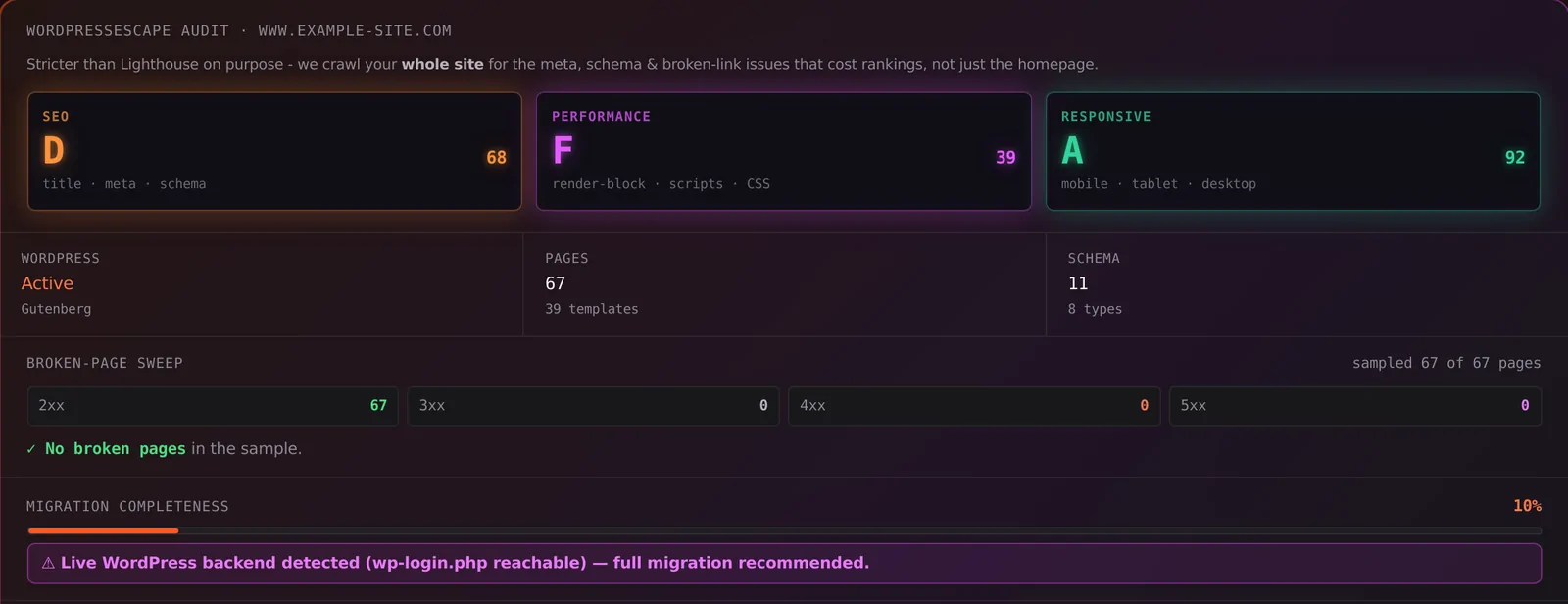
ดูตัวเลขของคุณเองก่อน
ทุกเว็บไซต์ไม่เหมือนกัน ลองทำ **การตรวจสอบฟรี 60 วินาที** กับเว็บไซต์ของคุณเพื่อดู **คะแนน SEO และความเร็วจริง** โดยไม่ต้องล็อกอิน แล้วค่อยตัดสินใจต่อไป ข้อความนี้สอดคล้องกับจุดขายของเครื่องมือ audit หลายเจ้า ที่ให้กรอก URL แล้วได้รายงาน SEO/ความเร็วแบบทันทีหรือภายในไม่กี่วินาทีถึงประมาณ 60 วินาที โดยไม่ต้องสมัครใช้งาน
สแกนเว็บไซต์ของฉันฟรี